
SMS Popup Guide: Definition, Examples & Best Practices
What is an SMS popup? Learn how SMS popups work, see real examples, and boost your sales.
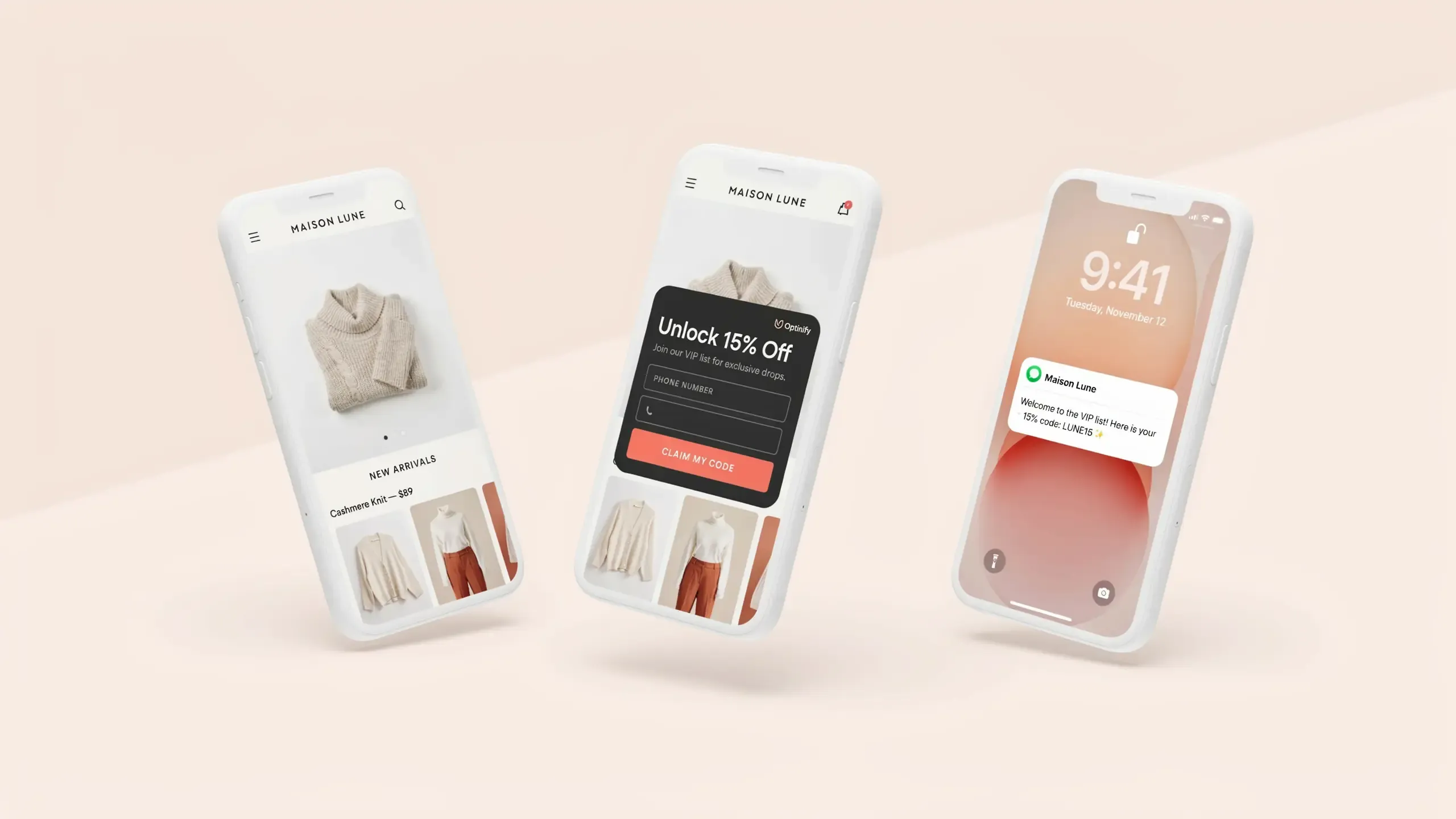
Most of your visitors run out of your store, and they never return; they never send you an email, a number, or anything. An SMS popup fixes that.
This guide will show you how SMS popups work, the 6 SMS popup formats that are easy to convert, actual examples of SMS popups, copy templates you can steal, and the 2 rules you need to follow to avoid legal hassles. SMS Popup is a service that sends SMS alerts to your customers.
What Is an SMS Popup?
An SMS popup is a small form that displays on your website and requests your site visitors to input their phone number.
After you send them your offer, you can send them promotions, order updates, back-in-stock notifications, or special discounts. Others refer to it as a text message pop-up or SMS opt-in pop-up. Operates as an email pop-up. The only difference? You are picking up a cell phone number rather than an email address. Besides, the guest receives a return.
Typically a coupon, free shipping, or early sale. In a few seconds, a curious browser becomes an SMS subscriber. Furthermore, in this it is all about speed.
Text messages have a 98% open rate, with most read within three minutes. That is why SMS is among the highest ROI channels for e-commerce today.
Why SMS Popups Work
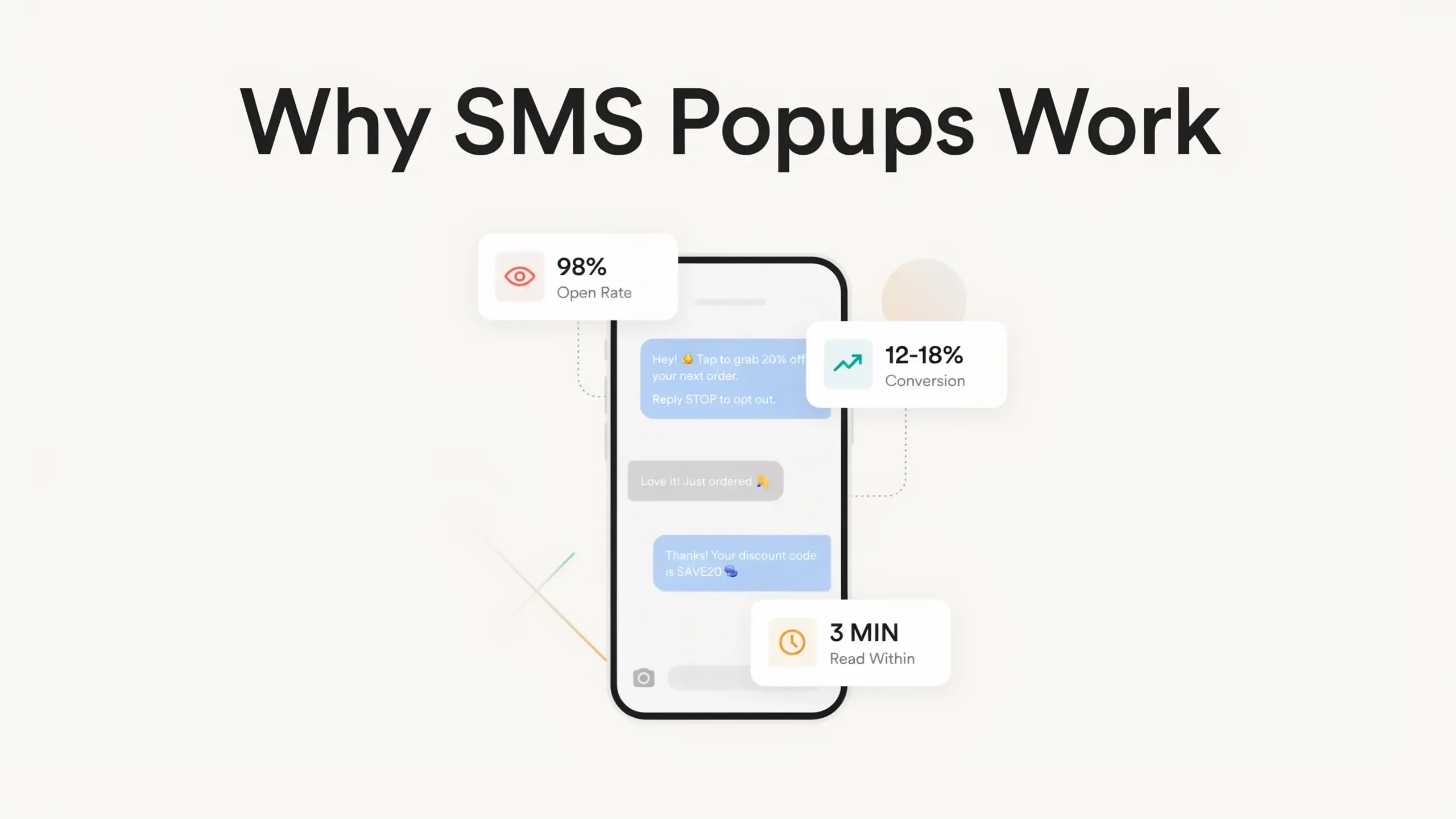
To understand the examples and design, it is important to understand why brands are rushing to build their SMS lists now. The facts speak for themselves:
- 84% of consumers are opted in to texts from at least one business.
- 79% of SMS subscribers are more inclined to make a purchase.
- 83% of consumers are the top texters.
- Ecommerce SMS flows convert at 12–18%.
Why does SMS get these numbers? People don't forget to read texts like they don't read emails. Notifications are on. The phone is already in their pocket! Reads when a text lands.
The downside? It is not allowed to send text messages to someone without their consent. This is where the SMS popup comes in. It is the method that changes raw visitors into subscribers you can legally send messages to.
Types of SMS Popups
Not all SMS popups are built the same. Different goals call for different formats. Here are the six types e-commerce brands lean on most, with real SMS popup examples for each.
1. Welcome SMS Popup
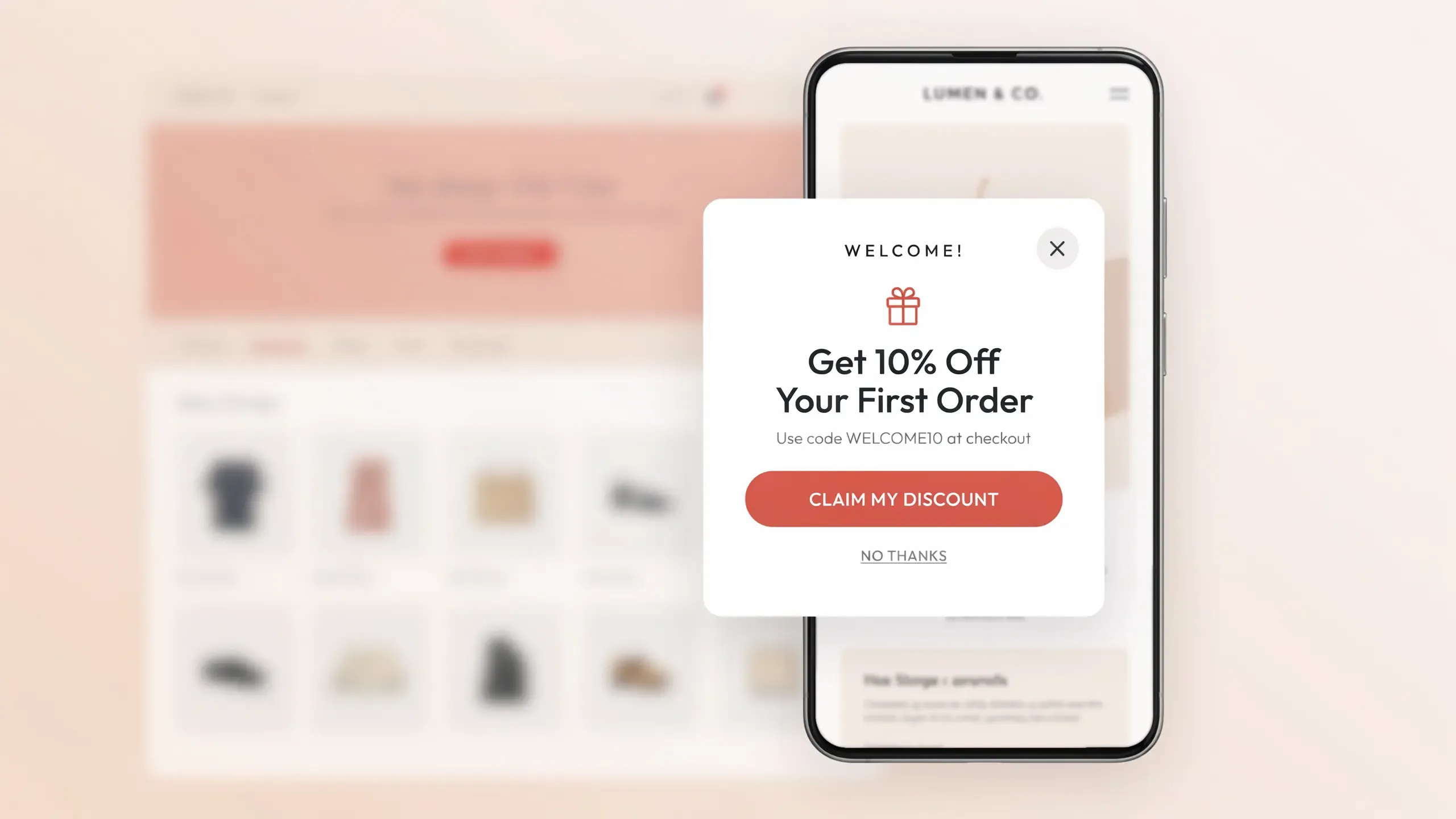
Welcome SMS popup example offering a first-order discount in exchange for a phone number.
What it is: A welcome popup is shown to first-time visitors shortly after they land on your site. It introduces your brand and offers a reason to subscribe.
When to use it: Early, but not instantly. Showing a popup the second someone arrives kills conversions. Wait 5 to 10 seconds first.
Example copy: "Welcome! Get 10% off your first order. Just drop your number below."
Why it works: You catch visitors while they are still curious, before they have made up their mind to leave.
2. Exit-Intent SMS Popup
Desktop and mobile exit-intent SMS popup comparison, showing how triggers differ by device.
What it does: Displays a popup if a visitor rolls over the back button or the address bar. That movement is a sign that they are going to leave.
When to use it: As a last-chance offer for visitors who did not convert. An exit intent popup beats a 5-second welcome popup almost every time. You are not interrupting anyone. They had already left.
Why it works: The popup has nothing to lose. Good Girl Snacks is a real example here. The brand collects phone numbers instead of emails on its exit popup, a smart match for Gen Z shoppers who live in their texts (Shopify, 2025).
One note for mobile. There is no cursor to track on a phone. Mobile exit intent watches for fast upward scrolling or a tap on the browser bar instead.
3. Abandoned Cart SMS Popup
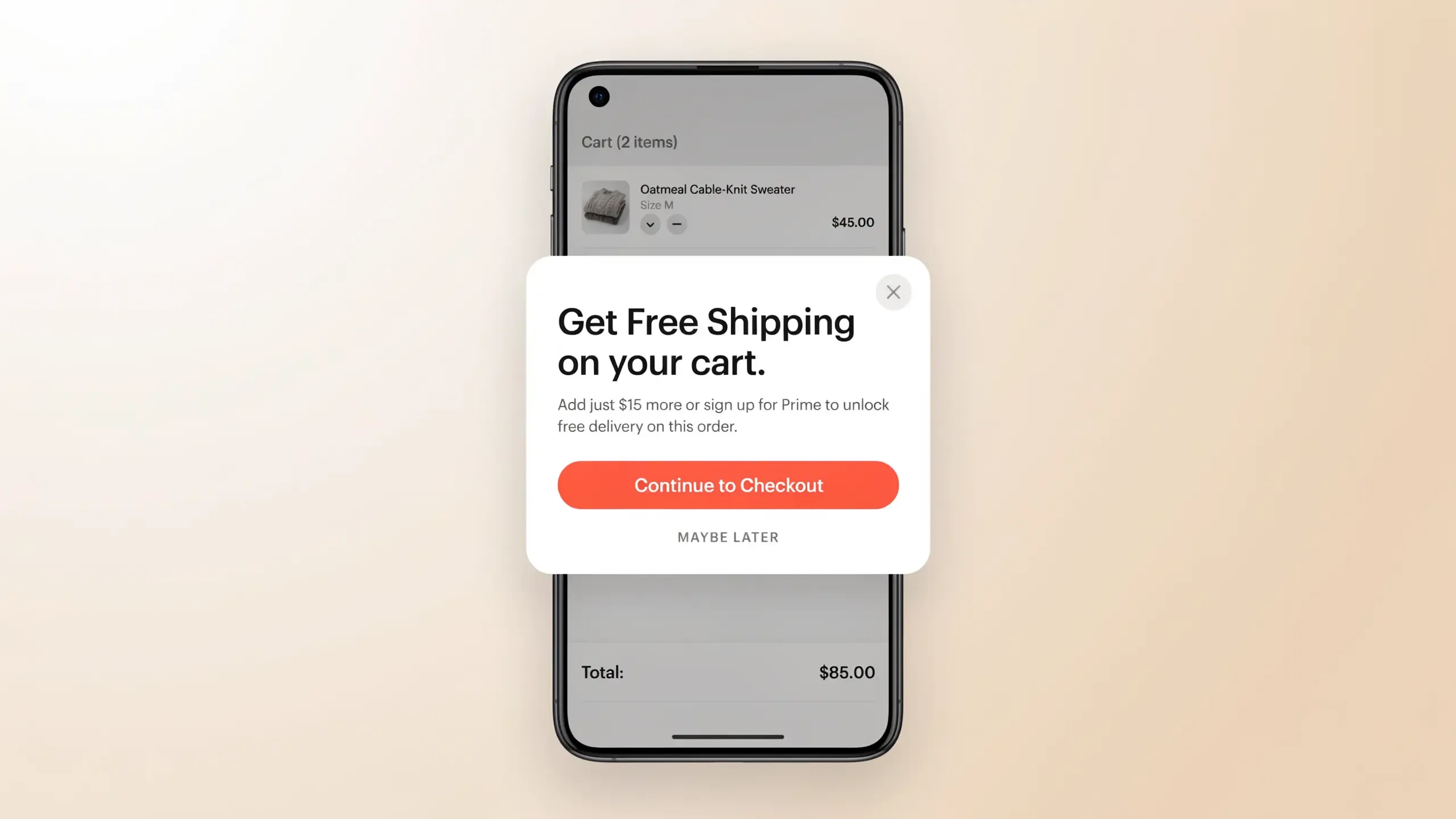
Abandoned cart SMS popup on mobile device with items left in cart and a phone number capture field.
What it is: A popup that appears when a shopper adds an item to their shopping cart but begins to move toward checkout.
When to use it: The moment a visitor with cart items moves to leave. This is a high-intent moment. They want your product. They just need a push.
Example copy: "Your cart is waiting. Get free shipping when you complete your order. Just enter your number."
Why it works: Around 70% of carts get abandoned, and those lost carts add up to roughly $4.6 trillion in value every year. A popup at this moment does two jobs at once. You collect a phone number, and you unlock automated follow-up texts.
And those follow-ups perform. Abandoned cart SMS messages pull a 21% click-through rate, one of the highest of any text type.
4. Gamified SMS Popup (Spin-to-Win)
Gamified spin-to-win with a prize wheel and phone number input field.
What it is: A popup with an interactive element, usually a prize wheel. Visitors enter their number for a chance to win a discount, free shipping, or a gift.
When to use it: When growing your SMS list fast is the goal. Spin-to-win popups convert well above the average popup conversion rate.
Example copy: "Spin for your welcome gift. Enter your number to play."
Why it works: The game does the selling. People want to spin. The phone number feels like a ticket, not a trade.
5. Scroll-Triggered SMS Popup
What it is: A popup that appears once a visitor scrolls past a set depth on the page, usually 50% to 70%.
When to use it: Blog posts, category pages, or anywhere you want to reach people who are clearly reading, not bouncing.
Example copy: "Enjoying this? Get members-only deals straight to your phone."
Why it works: You're only interrupting engaged visitors. Higher intent, better conversion. Simple as that.
6. Two-Step (Double Opt-In) SMS Popup
Two-step opt-in showing email capture in step one and phone number capture in step two.
What it is: A popup that asks for an email first, then follows with a second step asking for a phone number. The second ask usually comes with an extra incentive.
When to use it: When you want to grow your email and SMS list in one interaction. Some marketers call this the "Trojan Horse" method. Lead with the email ask, then sweeten the deal for the number.
Example copy: Step 1: "Get 10% off. Enter your email." Step 2: "Add your number for an extra 5% off."
Why it works: People hand over an email more easily than a phone number. But once they've taken step one, finishing step two feels natural. Psychologists call it the commitment principle. Marketers call it free money.
How to Design an SMS Popup That Converts
Design is not just about looks. It directly moves your popup conversion rate up or down. Here are the elements that matter most.
Clear, Specific Headline
Your headline has one job. Answer "What's in it for me?" before the visitor blinks.
Generic lines like "Join our list" fall flat. Nobody wakes up wanting to join a list. Specific offers win every time.
Try these instead:
- "Get 15% off your first order. No email needed."
- "Text first, shop smarter. Unlock your welcome gift."
- "Only for subscribers: early access to new drops."
Single-Field Form
Every extra field you add costs you sign-ups. Single-field forms lift conversions by 35% to 50%.
So start with the phone number only. Nothing else. You can always collect the email, name, or birthday later, once they are already on your SMS list.
Need both email and phone from day one? Use the two-step popup format we covered above. Same data, way less friction.
Mobile-First Design
Mobile-optimized popups convert more than desktop-only popups. And since most of your store traffic comes from phones anyway, designing your SMS popup for mobile first is not optional. It is the default.
Think about it. Someone signing up for texts is almost always holding their phone. If your popup looks broken on that screen, you have lost them.
A few practical tips:
- Keep the popup under 70% of the screen height. Google penalizes intrusive full-screen popups on mobile, so this protects your rankings too.
- Make the CTA button big and easy to tap. 48px height minimum.
- Skip heavy images. Slow popups don't get filled out.
- Test on both iOS and Android before you publish. They render differently more often than you'd think.
Strong CTA Button
Make the button text action-oriented and benefit-driven.
Weak vs. Strong Calls to Action (CTAs)
TCPA Compliance Language (Non-Negotiable)
Here is the part most SMS popup guides skip.
Every SMS popup shown to US visitors must include clear consent language. Not in your footer. Not on a separate page. Right inside the popup, visible before anyone hits submit. That's the Telephone Consumer Protection Act (TCPA).
A few compliance rules that trip brands up:
- You cannot use one checkbox for both email and SMS. SMS needs its own separate, explicit opt-in with TCPA disclosure language.
- Violations cost $500 to $1,500 per message. Per message. Send one bad campaign to 1,000 contacts and you could be staring at $500,000 or more in penalties.
- Since April 2025, FCC rules require businesses to accept opt-out requests through any reasonable method. "STOP" replies alone no longer cut it.
- You can't text or call subscribers before 8:00 AM or after 9:00 PM in their local time zone.
The good news? Most SMS platforms like Postscript, Attentive, and Klaviyo bake this disclosure language into their popup templates by default. Just do not delete it to make the design look cleaner. That tiny gray text is the cheapest legal protection you will ever get.
Optinify Pro Tip
The information below should not be relied upon as legal advice. Consult legal counsel to ensure your marketing activities align with the law.
Going Global? Mind the Gap
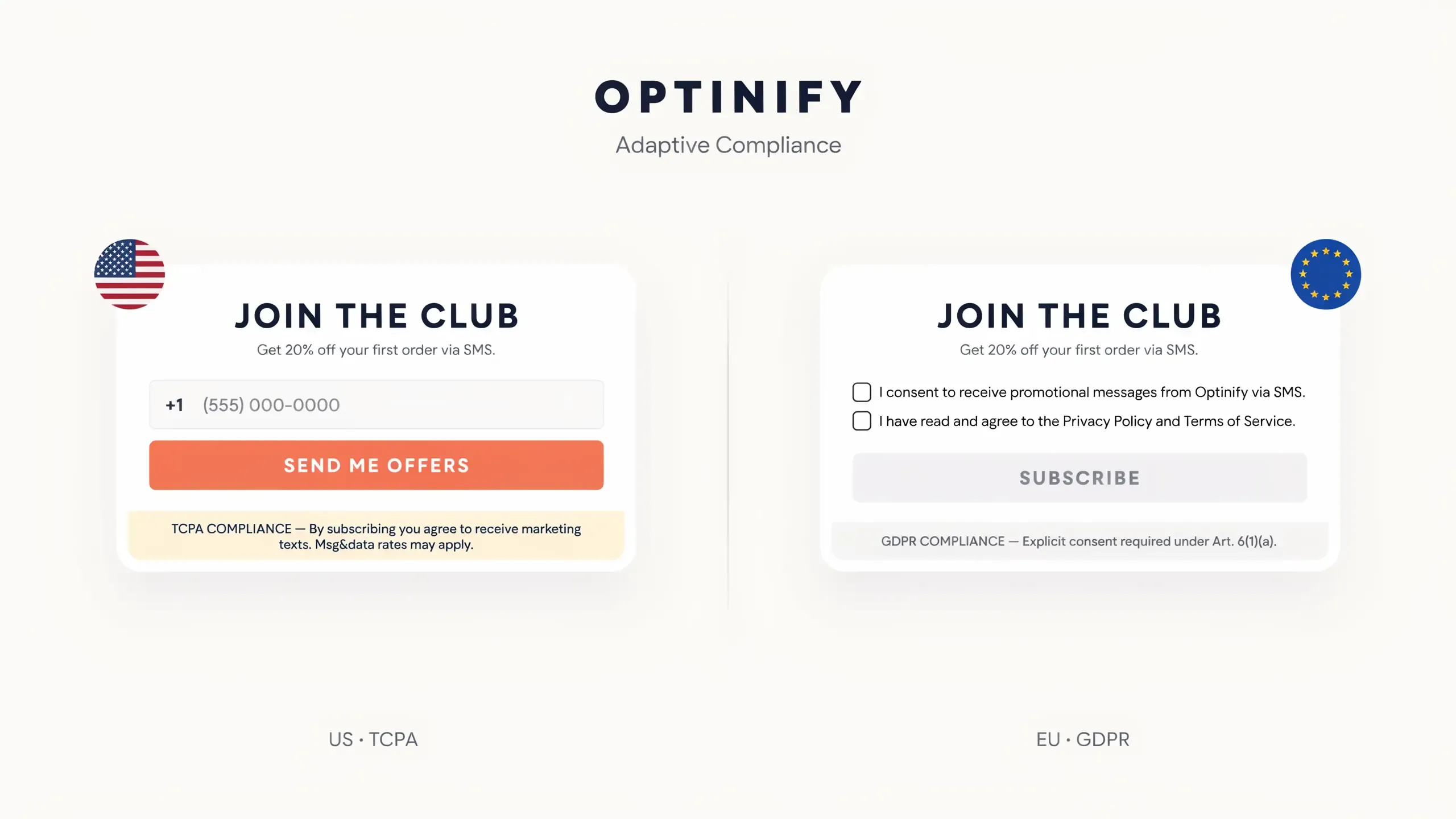
Do not ignore the laws of the countries where your customers live. Here is how the rules stack up globally:
Global Marketing Compliance Regulations
Three rules to keep you out of court (no matter where you sell):
1. Do not use a one-size-fits-all popup.
Most SMS platforms (like Klaviyo, Attentive, or Postscript) let you show different forms based on a visitor's IP address. Use it.
If a visitor is in Paris, trigger the GDPR-compliant version of your popup. If they are in New York, show the TCPA version. It is an extra ten minutes of setup that could save your business.
2. Make "Unsubscribing" as easy as signing up.
This is a universal rule, not just a US one. Whether it's "STOP," "CANCEL," or "UNSUBSCRIBE," the process has to be instant and automatic.
If a customer has to jump through hoops to leave your list, they will not complain to you. They will complain to regulators.
3. Identify yourself.
It sounds basic, but it is a legal requirement in most of the world. Every automated flow needs to clearly state who is texting.
If your welcome text is just "Here's your 10% off," you're setting yourself up for spam reports. Always lead or end with [Your Brand Name].
Optinify Pro Tip
The information below should not be relied upon as legal advice. Consult legal counsel to ensure your marketing activities align with the law.
SMS Popup Timing: When to Show It
Timing is one of the biggest levers in popup performance.
Here is a simple timing:
Recommended Trigger Settings by Visitor Type
What Makes a High-Converting SMS Popup Offer?
The offer often matters more than the design. A plain popup with a strong offer beats a beautiful popup with a weak one. Here is what performs best:
Percentage discounts are the most common, and they work. But specificity wins. "Get 10% off" beats "Save big" every single time. Vague savings feel like a trick. Exact numbers feel like a deal.
For more offer angles that convert, see these sales promotion examples.
Free shipping is a quiet powerhouse. 39% of online shoppers have abandoned a cart because of extra costs like shipping and tax. Removing that pain in exchange for a phone number is a fair trade in the shopper's mind.
Dollar-off offers like "$10 off your first order" can beat percentage discounts on stores with higher order values. The value is concrete. Nobody has to do math.
Exclusive access works best for community-driven or limited-drop brands. "Be the first to know when new drops land" turns the opt-in into a status thing, not a coupon hunt.
Free gift with first order gets your product into a subscriber's hands right away. Brands in the beauty and subscription box space use this well. It costs you a sample. It buys you trust.
Need More Inspiration?
Here are 21 lead magnet ideas you can adapt for your SMS popup offer.
And here's what to avoid:
- Vague offers like "Join for exclusive content." Exclusive content of what?
- Discounts so deep they eat your margin. A 25% welcome offer only makes sense if your subscriber lifetime value backs it up.
- Fake scarcity. "Only 3 left!" when there are 300 left. Shoppers can smell it, and it poisons the relationship before the first text.
SMS Popup Copy That Works: Templates You Can Use
Here are copy frameworks you can steal and adapt for your own store. One rule before you start. Keep it short. Texts aren't essays, and neither are popups.
Welcome Popup
- Headline: Get [X%] off your first order
- Subtext: Drop your number and we will send your code right to your phone.
- CTA: Unlock My Discount
- Compliance: [TCPA language]
Exit-Intent Popup
- Headline: Wait. Your cart misses you.
- Subtext: Enter your number and we'll send you a [X%] off code to bring you back.
- CTA: Save My Spot
- Compliance: [TCPA language]
Abandoned Cart Popup
- Headline: You left something behind.
- Subtext: Your [product name] is still waiting. Grab it before it sells out.
- CTA: Take Me Back
- Compliance: [TCPA language]
VIP Access Popup
- Headline: Drops before everyone else.
- Subtext: Join our text list and get first access to new collections.
- CTA: Get Early Access
- Compliance: [TCPA language]
Gamified Popup
- Headline: Spin for your welcome gift.
- Subtext: One spin, instant reward. Just enter your number to play.
- CTA: Spin Now
- Compliance: [TCPA language]
Notice the pattern across all five. The headline sells the benefit. The subtext explains the trade. The CTA uses first-person, action words. And the compliance line is always there, every single time. Copy the structure even if you rewrite the words.
SMS Popup Best Practices: A Quick Checklist
Before you hit publish on your SMS popup, run through this list. It takes two minutes and catches the mistakes that cost you subscribers.
Offer & Relevance
- Is the incentive specific and valuable enough to be worth a phone number?
- Does the offer match what the visitor is looking at (product page, cart, homepage)?
Design
- Does the form start with a single field?
- Is the CTA button action-oriented, not just "Submit"?
- Does the popup match your brand's fonts and colors?
- Is there an easy, visible close button?
Timing & Targeting
- Is the popup delayed properly (never in the first 5 seconds)?
- Does the timing match the visitor type (new vs. returning, cart vs. browsing)?
- Is it set to show once per session, not on repeat?
Compliance (US)
- Does the popup include TCPA disclosure language?
- Is there a separate opt-in for SMS, not bundled with email?
- Does the disclosure link to your Terms of Service and Privacy Policy?
- Is opting out easy ("Reply STOP to cancel")?
Mobile
- Is the popup designed and tested for mobile first?
- Is the CTA button at least 48px tall?
- Does it load fast, with no heavy images?
Analytics
- Are you tracking impressions, clicks, and conversions separately?
- Is an A/B test running on your offer or headline?
If you can tick every box, your SMS popup is ahead of most stores before it even goes live.
Common SMS Popup Mistakes (and How to Fix Them)
Showing it too early
Showing an SMS popup the instant someone lands on your site creates friction. They have not seen your products yet. They have no reason to trust you. And a popup in the first 5 seconds can push your bounce rate up.
Fix: Set a minimum 10 to 15 second delay or use scroll-depth triggers instead.
Asking for too much too fast
Name, email, and phone number in one form? Visitors see the effort and close it on sight.
Fix: Ask for one thing. The phone number. Get the rest later.
Missing TCPA compliance language
This one is not just a mistake. It is a legal liability. TCPA fines run $500 to $1,500 per message.
Fix: Put compliant disclosure language right in the popup, visible before anyone submits.
Using the same popup everywhere
Showing the exact same welcome discount on your homepage, product pages, and cart page treats every visitor like the same person. They are not.
Fix: Segment by page, behavior, and visitor type. Cart pages get cart-focused copy. The homepage gets the welcome offer.
Ignoring mobile
A desktop popup crammed into a phone screen is a fast way to lose a visitor.
Fix: Design for mobile first. Then test on real devices, not just your browser's preview mode.
How SMS Popups Fit Into Your Wider Marketing Strategy
An SMS popup is not a standalone tool; it fits into a broader Shopify lead generation strategy that turns traffic into long-term revenue. It is the front door to your whole SMS marketing strategy. Collecting numbers is step one. What you do next is where the money is.
Here is how the pieces connect:
Welcome Flow
The moment someone subscribes, your SMS tool should fire off a welcome text with their discount code. First impressions happen here.
Abandoned Cart Recovery
A visitor who shared their number but did not buy can get an automated abandoned cart text. These convert at 13.8% on average. That is recovered revenue from people who were already gone.
Campaign List
Every subscriber grows the list you can text for flash sales, product launches, and seasonal pushes. And frequency matters more than most brands think. Stores sending weekly SMS see 21% more revenue than monthly senders.
Segmented Lists
This is the advanced play. Tag subscribers by what they were browsing when they opted in. Someone who signed up on a running shoes page should get different texts than someone who subscribed from the homepage. Same list, smarter sends.
The takeaway here is simple. Your SMS popup is only as valuable as what happens after the opt-in. Build the welcome flow and cart automation first. Then launch the popup.
Most SMS popup platforms let you retarget visitors who dismissed the popup the first time. Skipping this leaves subscribers on the table.
Fix: Show a different popup with a stronger offer when a returning visitor comes back.
SMS Popup vs. Email Popup: Which Should You Use?
Both.
People guard their phone numbers more than their inboxes. But the subscribers you do win are worth far more. Harder to get, better to have.
That is why the smartest brands collect both. Use a two-step popup, or run separate popups for email and SMS. Email handles the nurturing. SMS handles the urgency. Different jobs, same list growth.
Optinify Pro Tip
Not sure what works for email? Browse the email popup examples before you decide.
Starting from scratch? Launch the email popup first and warm up your list. Add the SMS popup once your infrastructure is ready. That means an SMS marketing platform, automation flows, and compliant opt-in language.
Frequently Asked Questions: SMS Popup
Final Thoughts on SMS Popups
SMS popups are one of the highest-leverage tools in ecommerce marketing. If you use them right.
The fundamentals aren't complicated. Show the right offer to the right visitor at the right moment. Stay TCPA-compliant. Design for mobile. Then connect the popup to an automated SMS flow that does the selling for you.
So start simple. A clean SMS popup with one specific offer, one phone number field, and proper compliance language is enough to win your first hundred subscribers. From there, test your headlines, tighten your timing, and build the automation that turns those subscribers into revenue.
Your next subscriber is already on your site
Optinify makes it easy to build the SMS popups you just read about. Pick a template, set your offer, and go live in minutes.
Free 14-day trial • Setup in 60 seconds • Human support
What to read next
Ecommerce Popups: 14 Types, Examples & Best Practices
Learn how ecommerce popups work and discover 14 high-converting types. Grow sales without hurting user experience.
Read Article
21 Website Popup Examples for Shopify Stores and Why They Work
Explore 21 website popup examples for Shopify stores. See popup ideas for email capture, cart recovery, discounts, free shipping, SMS, and more.
Read Article
Spin to Win Popup: How Shopify Stores Can Grow Email Signups and Sales
Learn how spin to win popup actually work! Discover the best prizes and perfect timing strategies to boost conversions and grow Shopify sales.
Read Article