

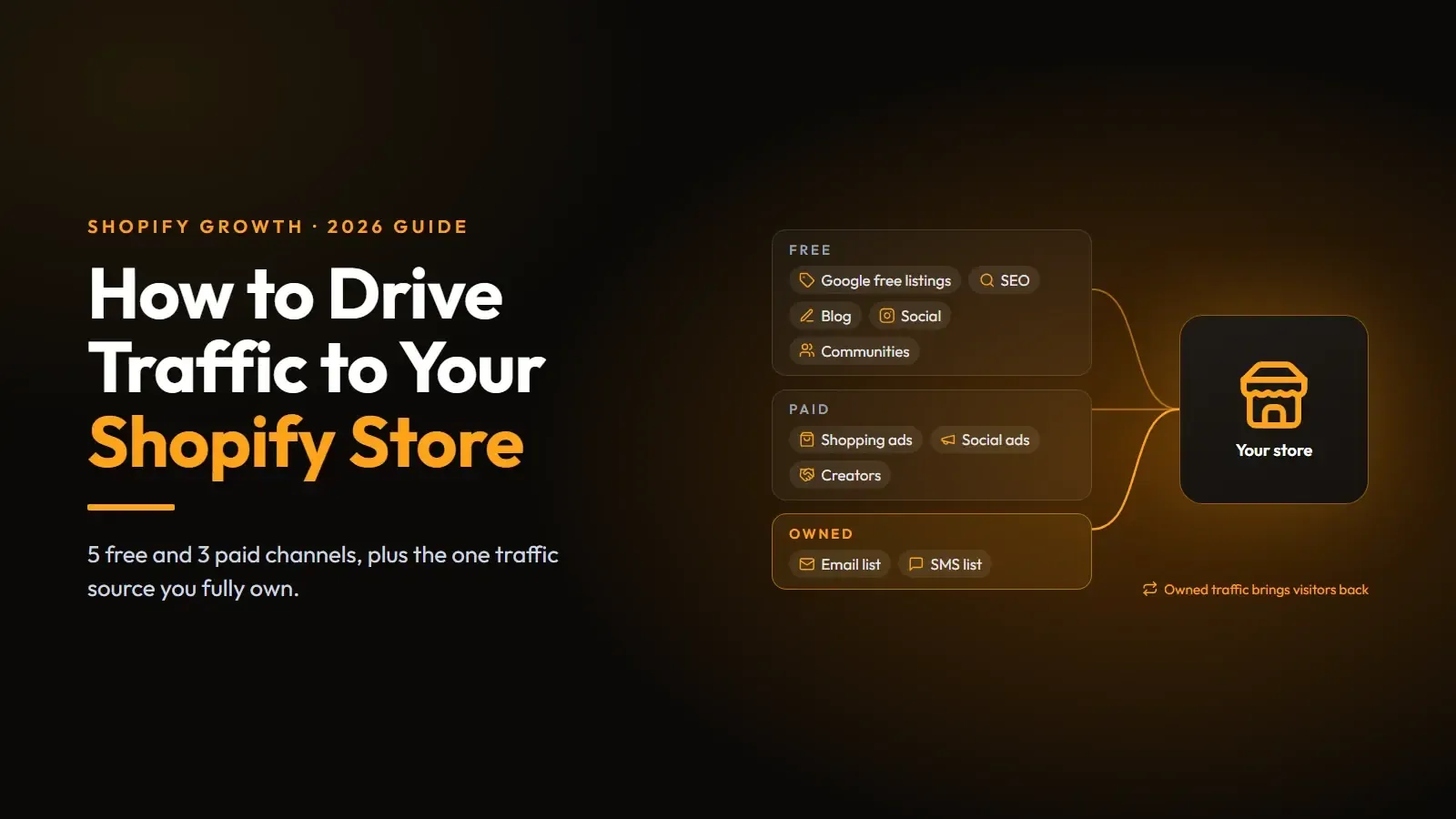
Most new Shopify stores try too many traffic sources at once. Type "how to drive traffic to Shopify store" into Google and you will get lists of 27 tactics, and trying all of them at once is the fastest way to burn a month and a budget with nothing to show for it.
This guide does it differently. You will check where your visitors already come from, pick from five free and three paid ways to drive traffic, and then make sure the people who do show up come back.
Start With Your Own Shopify Store Traffic Data
Before you add a channel, look at the ones you already have. In your Shopify admin, go to Analytics > Reports and open Sessions by referrer. Shopify's acquisition reports also include sessions over time, sessions by location, and visitors over time.
The referrer report splits your sessions into types of traffic, such as direct traffic, organic search, social, email, and referral traffic from other sites. Three questions to answer from it:
- Which source sends the most sessions?
- Which source sends sessions that actually buy?
- Is anything growing on its own, without you pushing it?
That third one matters most. If Pinterest is quietly sending 200 sessions a month with zero effort, that's your cheapest channel to double. And if you see a sudden spike in traffic from one source, find out why before it fades.
Pick Channels by Speed, Cost, and Effort
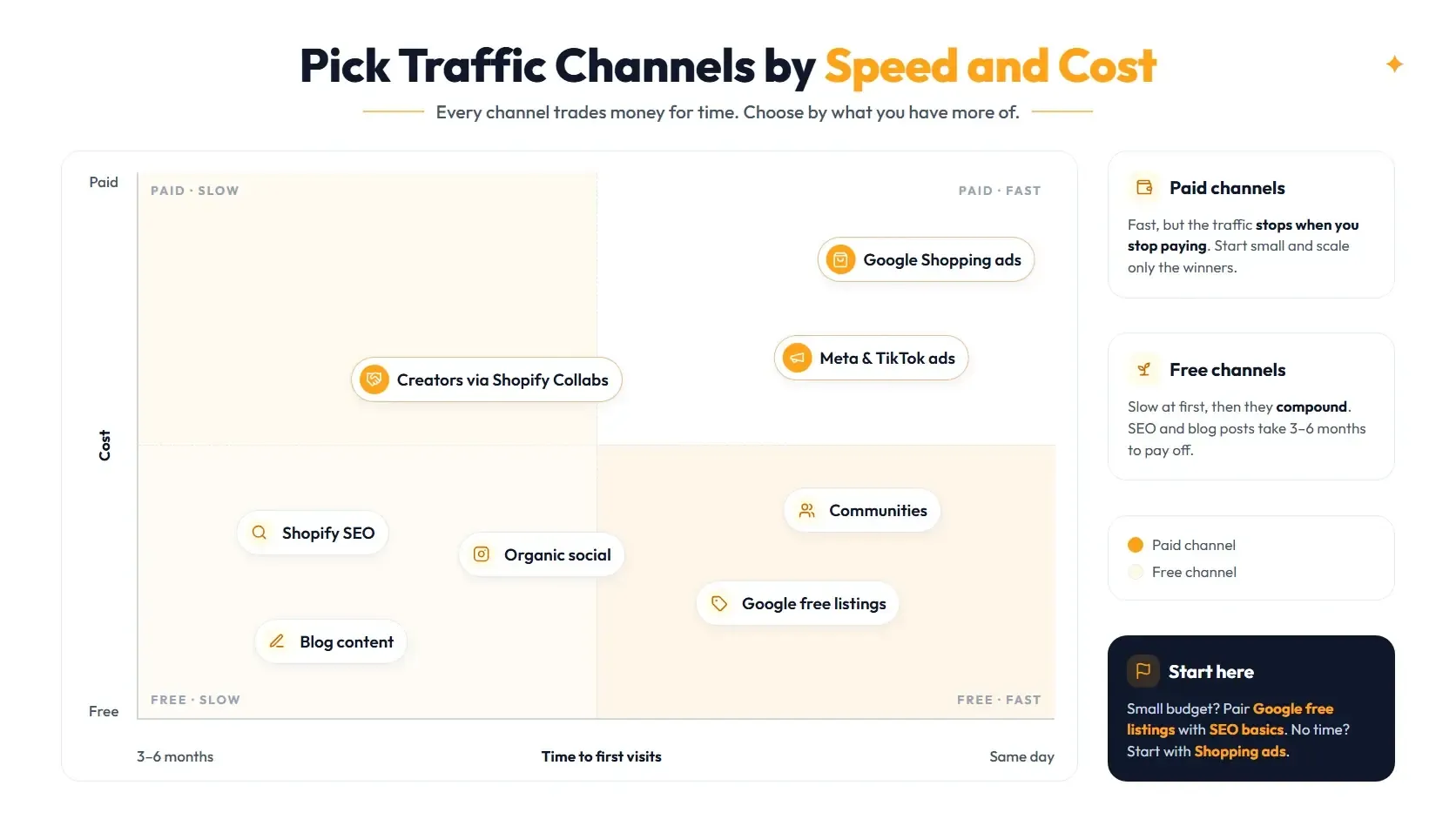
Every channel trades money for time somewhere. Here is how the eight below compare, so you can choose based on what you have more of right now.
A good starting pair for a new ecommerce store with a small budget is free listings plus SEO basics. If you have budget but no time, start with paid traffic from Shopping ads and add the free channels later.
How to Drive Traffic to Your Shopify Store for Free
Free traffic costs time instead of money. These five strategies to drive traffic compound, which means slow months at the start and steady visits later.
1. Get Your Products Into Google's Free Listings
This is one of the best ways to get traffic to your Shopify store. Install the Google & YouTube sales channel, connect Google Merchant Center, and your products sync from the Shopify admin.
People searching for products on the Shopping tab are potential customers who already want to buy. Clean titles, accurate prices, and good images do most of the work here.
2. Optimize Your Shopify SEO Basics
Search engine optimization (SEO) is how you generate organic traffic that keeps coming without ad spend.
For Shopify stores, that translates into a short SEO checklist:
- Do keyword research first. Pick one keyword per product page and collection page.
- Edit the page titles and descriptions in each page's "Search engine listing" section.
- Write your own product descriptions instead of pasting the manufacturer's copy that hundreds of other stores also use.
- Link related products and collections to each other, and add alt text to product images.
3. Use Content Marketing to Answer Buyer Questions
Every Shopify online store comes with a built-in Shopify blog, so you don't need another tool. Skip "10 fun facts about our brand." Write the posts your buyers search for before they buy: sizing guides, care instructions, "X vs Y" comparisons, and "best X for Y" roundups that feature the products you sell honestly. Each post should link to the product or collection it's about.
4. Post Where Your Buyers Already Scroll
Pick one or two social platforms, not five. A home decor store probably belongs on platforms like Instagram and Pinterest. A gadget store might do better with short videos on TikTok and YouTube Shorts.
Show the product being used. Unboxing clips, before-and-after shots, and customer photos (with permission) build brand awareness faster than polished brand graphics. Put a link to a specific product or collection in your bio, not just your homepage.
5. Join Communities Without Spamming Them
Reddit, Facebook groups, and niche forums can send very targeted visitors. They can also ban you in a day. The rule is simple: answer questions properly, and mention your store only when it actually helps.
Paid Ways to Drive Traffic to Your Shopify Store
Paid advertising is faster, but the traffic stops the moment you stop paying. Start small with paid ads, measure sales per channel, and scale only the winners.
6. Run Google Shopping Ads
Once your products are in Merchant Center for free listings, you are most of the way to paid Shopping ads. The same product feed powers both, and you can connect Google Ads through the Google & YouTube channel. Start with your best sellers, not your whole catalog.
7. Run Social Ads for Discovery
Ads on Meta or TikTok work best for products people don't know to search for yet. Test two or three creatives with a small daily budget, then keep the one that brings buyers. A cheap click that never adds to cart is still expensive.
Drive Repeat Traffic to Your Shopify Store
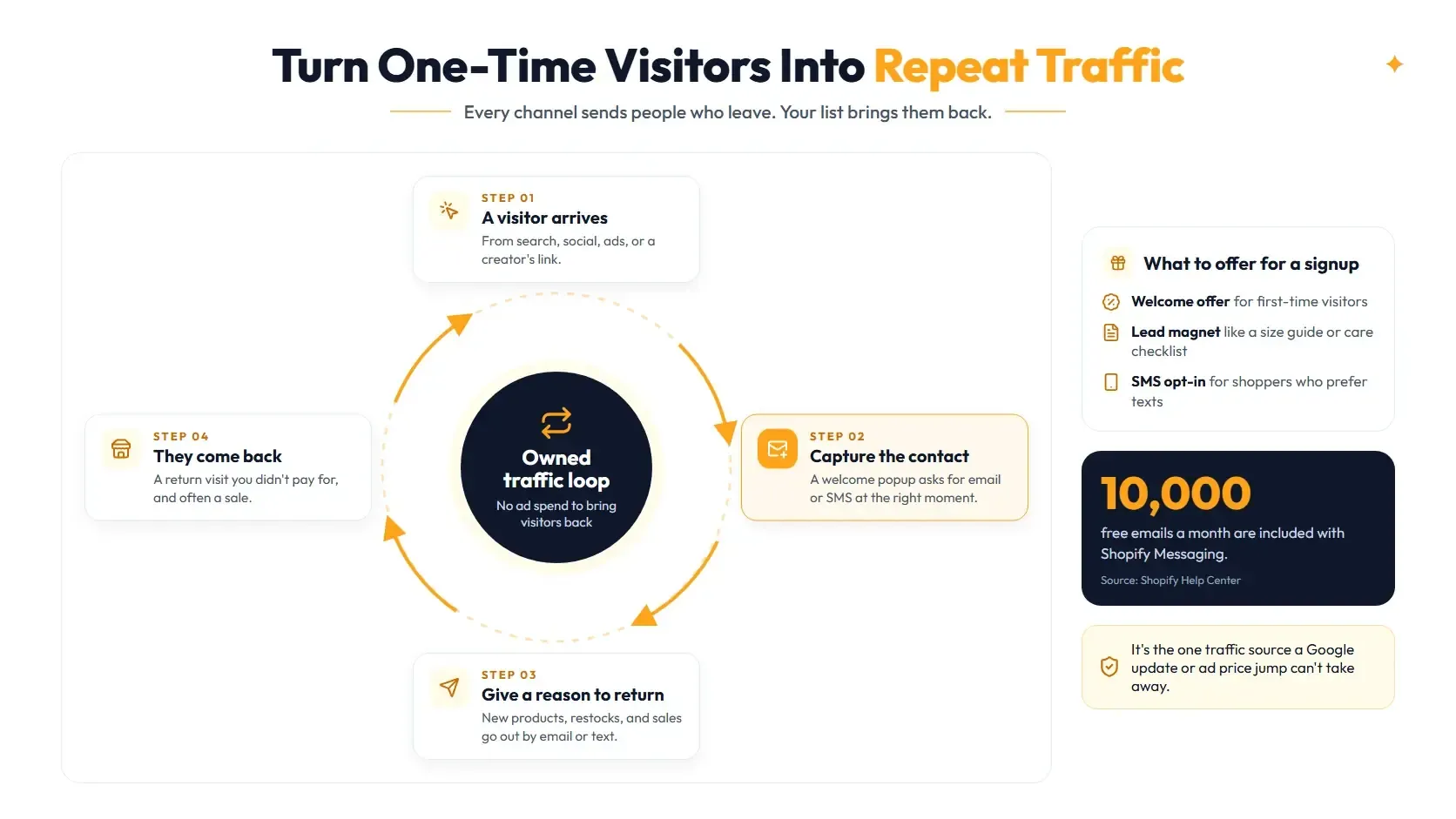
Before you spend a dollar on new ads, plug the leak. Most visitors leave without buying, and if you have no way to reach them, they are gone for good.
Here is the math with simple numbers. Say you drive 10,000 visitors and 2% buy. That is 200 orders and 9,800 people who leave. If just 5% of them join your email or SMS list, you have 490 people you can bring back with every launch, restock, and sale, without paying for the click again. Your rates will differ, which is why you measure them.
Optinify is a Shopify popup app we built for exactly this. It turns visitors into email subscribers with a welcome popup and into SMS subscribers with an SMS popup, then sends them to the tools you already use.
How to set it up:
- Install Optinify from the Shopify App Store.
- Pick a popup template and lead with an offer: a welcome discount, free shipping, or a useful lead magnet.
- Connect your email tool, such as Klaviyo, Omnisend, Mailchimp, or Brevo, so new subscribers flow straight into your welcome emails.
- Set targeting rules: show the popup on exit intent, after a scroll, or only to new visitors, so it stays out of buyers' way.
- Run an A/B test on your offer or headline and keep the winner.
- After 30 days, check views, signups, and revenue in your Optinify analytics, then double down on what works.
If you are going to pay for traffic, set up the capture layer first. Otherwise, you are filling a bucket with a hole in the bottom.
Getting Shopify Traffic but No Sales?
If your Shopify store gets traffic but you are not making sales, the problem is usually a mismatch between the visitor and the page you send them to. Check which sources send sessions that never add to cart, then fix the landing page, the offer, or the targeting before you buy more traffic.
Common problems are ads that promise one thing and land on another, a slow ecommerce website on mobile, surprise shipping costs at checkout, and no reviews to build trust. Our Shopify conversion rate optimization guide walks through the full audit.
FAQs: How to Drive Traffic to a Shopify Store
Make Every Visit Count
Pick two channels from this list, give them 90 days, and measure them in the Sessions by referrer report. And before you spend a dollar on ads, set up Optinify to capture the visitors you already have.
Optinify adds email and SMS popups to your Shopify store in about a minute, with targeting that keeps them out of the way of buyers. Start your 14-day free trial and turn your next visitor into a subscriber.