
Free Shipping Popup Guide: Examples and Shopify Setup
Learn how a free shipping popup works, see examples, and set up a smart Shopify free shipping offer that increases AOV without hurting profit.
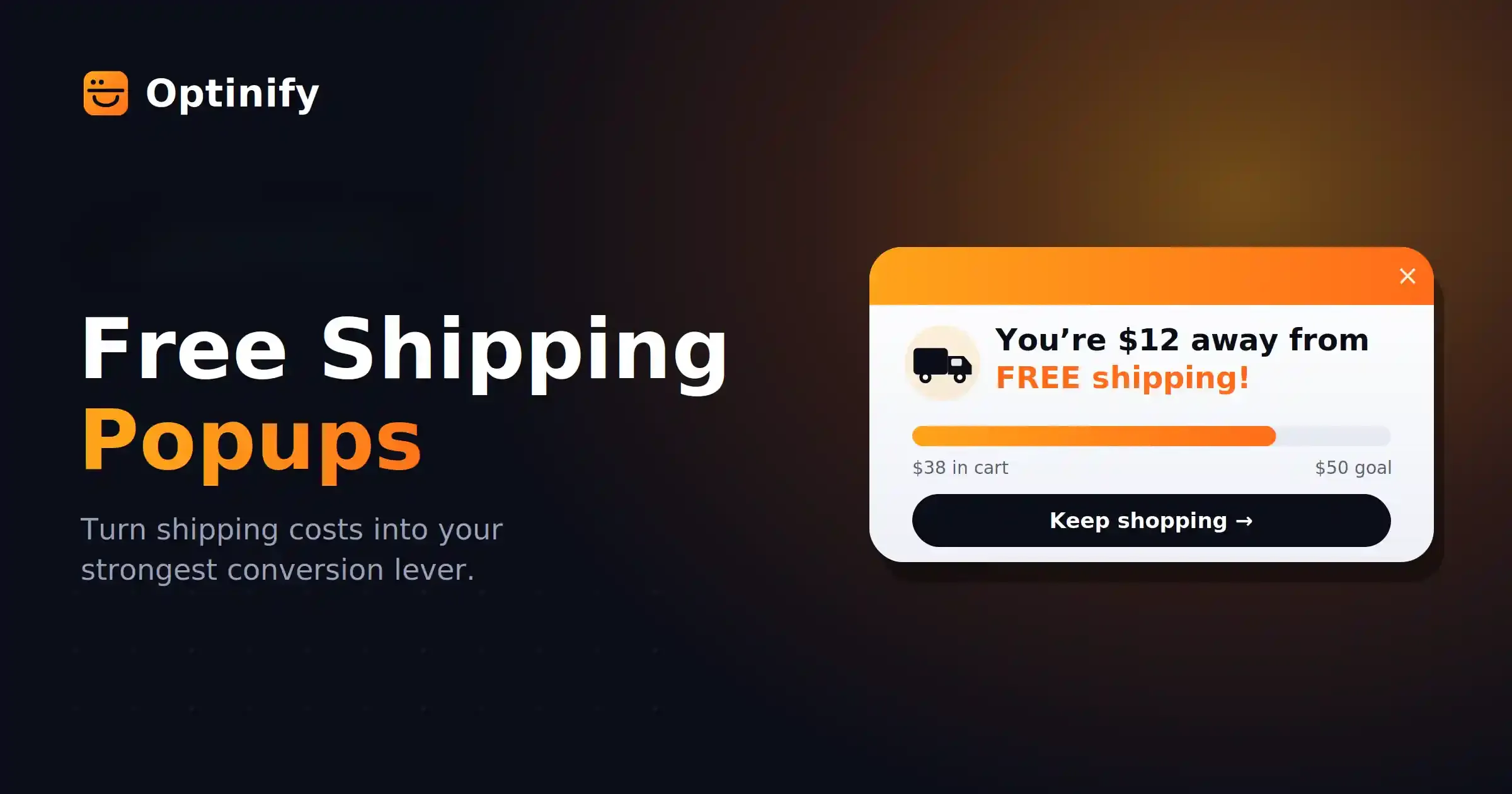
A free shipping popup lets customers know about your store’s free delivery offer.
For example, it might say, “Free shipping on orders over $50.” Or it could show, “You are $12 away from free shipping.”
The main goal is to help shoppers feel more confident about buying.
What Is a Free Shipping Popup?
A free shipping popup is a small message on your website that lets visitors know about a free shipping deal.
Sometimes, the offer is available for every order, but more often, customers need to spend a certain amount to qualify.
For example: “Spend $60 and get free shipping.”
How a free shipping popup works
A free shipping popup uses display rules to control how it works.
These rules set when the popup shows up and who can see it.
Free shipping popup triggers, when it appears & best use
Make sure your popup matches your checkout rule.
For example, if your popup says “Free shipping over $60,” your checkout should also give free shipping for orders over $60.
Why Free Shipping Popups Work
A free shipping popup is effective because it takes away a common obstacle to buying.
Most shoppers are fine with the product price, but they don’t like seeing an extra shipping fee at checkout.
A well-designed popup can help your store in several ways:
- Reduce cart abandonment
- Increase average order value
- Grow your email list
- Promote a first order
- Show a clear spending goal
- Protect margin with geo-targeting
A threshold message is effective because it gives shoppers a simple goal to reach.
For example: “You are only $12 away from free shipping.”
This feels easier for shoppers than paying for delivery.
4 Free Shipping Popup Strategies With Examples
Here are some of the best free shipping popup examples for e-commerce. Each one helps overcome a common obstacle that can stop customers from buying.
Free shipping is also one of the most practical sales promotion examples for e-commerce stores because it removes a common purchasing barrier without reducing the listed product price.
Free Shipping Popup Strategies With Examples
1. Welcome popup
A welcome popup is effective for attracting new visitors who come from ads, SEO, TikTok, or influencer posts.
Avoid showing the offer immediately when a shopper arrives.
Instead, set a short delay or wait until the visitor has scrolled about 30% of the page.
Some effective call-to-action options include:
- Claim Free Shipping
- Start Shopping
- Send My Code
These options usually perform better than a generic “subscribe for updates” popup.
2. Threshold Progress Bar
A threshold progress bar shows shoppers how much more they need to spend.
For example, you might display, "You are $X away from free shipping.”
This feature works well in the cart drawer, mini cart, product page, or cart page.
If your app allows, set up a dynamic free shipping progress bar in Shopify that updates based on the cart value.
You can pair the progress bar with small add-ons.
Some good add-ons are samples, socks, refills, care kits, gift wrap, and small accessories.
3. Free Shipping Popup for Cart Abandonment
An exit intent popup can help keep shoppers from leaving your store.
Show this popup to visitors who have items in their cart.
A free shipping popup for exit intent should come across as a friendly last reminder.
Avoid showing the popup to every visitor.
If you use it too often, shoppers might start expecting the offer and wait for it.
4. Geo-Targeted Free Shipping Popup
A geo-targeted popup displays the offer based on each visitor’s region.
This is important since shipping costs vary from country to country.
Set this up when shipping within your country is affordable, but sending orders abroad is expensive.
This approach helps you offer free shipping while protecting your profits.
How to Set a Free Shipping Threshold
- Don’t guess your free shipping threshold. Use your store’s data to find what works best.
- Try this formula: Free Shipping Threshold = Median Order Value + Small Upsell Amount + Shipping Buffer.
- For example, if your median order value is $42 and your average shipping cost is $6, a threshold of $55 or $60 works well.
- Make sure your minimum spend feels reasonable. It should be like adding one small item to the cart, not making a whole new purchase.
- Check that your advertised threshold matches your checkout settings. No matter what platform you use, the number in your popup should be the same as in your checkout.
Free Shipping Popup Copy Ideas
Keep popup copy brief.
Make sure shoppers can understand the offer right away.
Free Shipping Popup Copy Ideas
Strong popup copy shows the offer, the rule, and the next step.
That is what good e-commerce free shipping message examples should do.
Free shipping popup for Shopify stores
Best Shopify popup apps let merchants create free shipping popups.
Optinify is a Shopify popup app. It creates popups not only to engage the store visitors but also to speed up the revenue. You can create free shipping popup using Optinify.
How to create a Free Shipping Popup with Optinify
To create a free shipping popup with Optinify, you need to install it from Shopify app store.
Steps to create a free shipping popup:
- Tap on create campaign.
- Select a template.
- Customize your popup according to your brand.
- Set up your targeting rules.
- Publish.
Optinify also offers these features:
- Cart value targeting
- Exit intent
- Device rules
- Country rules
- Email capture
The features listed above are more important than the app’s name.
Optinify is one of the best Shopify marketing tools for promoting offers, capturing leads and converting visitors into customers.
Free Shipping Popup Best Practices
A good popup helps users find what they need without getting in their way.
Here are some simple rules to follow:
- Display the popup after the user shows interest, not right when the page loads.
- Keep your message brief and to the point.
- Choose a simple and clean design for your popup.
- Make sure the close button is easy to find.
- Use a compact design for mobile devices.
- Make sure your popup follows the same rules as your checkout process.
- Only show the popup once during each user session.
- Test how your popup affects conversion rate, average order value, cart abandonment, and profit per order.
An ideal Shopify popup app should have all the features mentioned above. And Optinify has all of these.
Google warns that intrusive popups and interstitials can make content harder to access and may hurt your search rankings. That’s why it’s important to consider mobile SEO when using free shipping popups. On mobile, use a banner, slide-in, or cart message instead of a full-screen popup.
Optinify Pro Tip
Read more about mobile popup
Frequently Asked Questions
Thoughts on creating free shipping popup
A free shipping popup works best when it solves a real buying problem.
If you run a Shopify store, a free shipping popup is a must try.
Choose a reasonable free shipping threshold and make sure it matches what customers see at checkout. After that, focus on tracking your profit, not just your sales.
What to read next

21 Website Popup Examples for Shopify Stores and Why They Work
Explore 21 website popup examples for Shopify stores. See popup ideas for email capture, cart recovery, discounts, free shipping, SMS, and more.
Read Article
Spin to Win Popup: How Shopify Stores Can Grow Email Signups and Sales
Learn how spin to win popup actually work! Discover the best prizes and perfect timing strategies to boost conversions and grow Shopify sales.
Read Article
How to Add a Popup to Shopify Store: Step-by-Step Guide
Learn how to add a popup to your Shopify store with Optinify. Follow this step-by-step guide to create, customize, test and publish Shopify popups.
Read Article