
29 Popup Types That Boost Conversions (+ Examples)
There are far more popups than the plain email box most stores start with. Here are 29 types by format, trigger, and goal. Plus which ones actually convert.
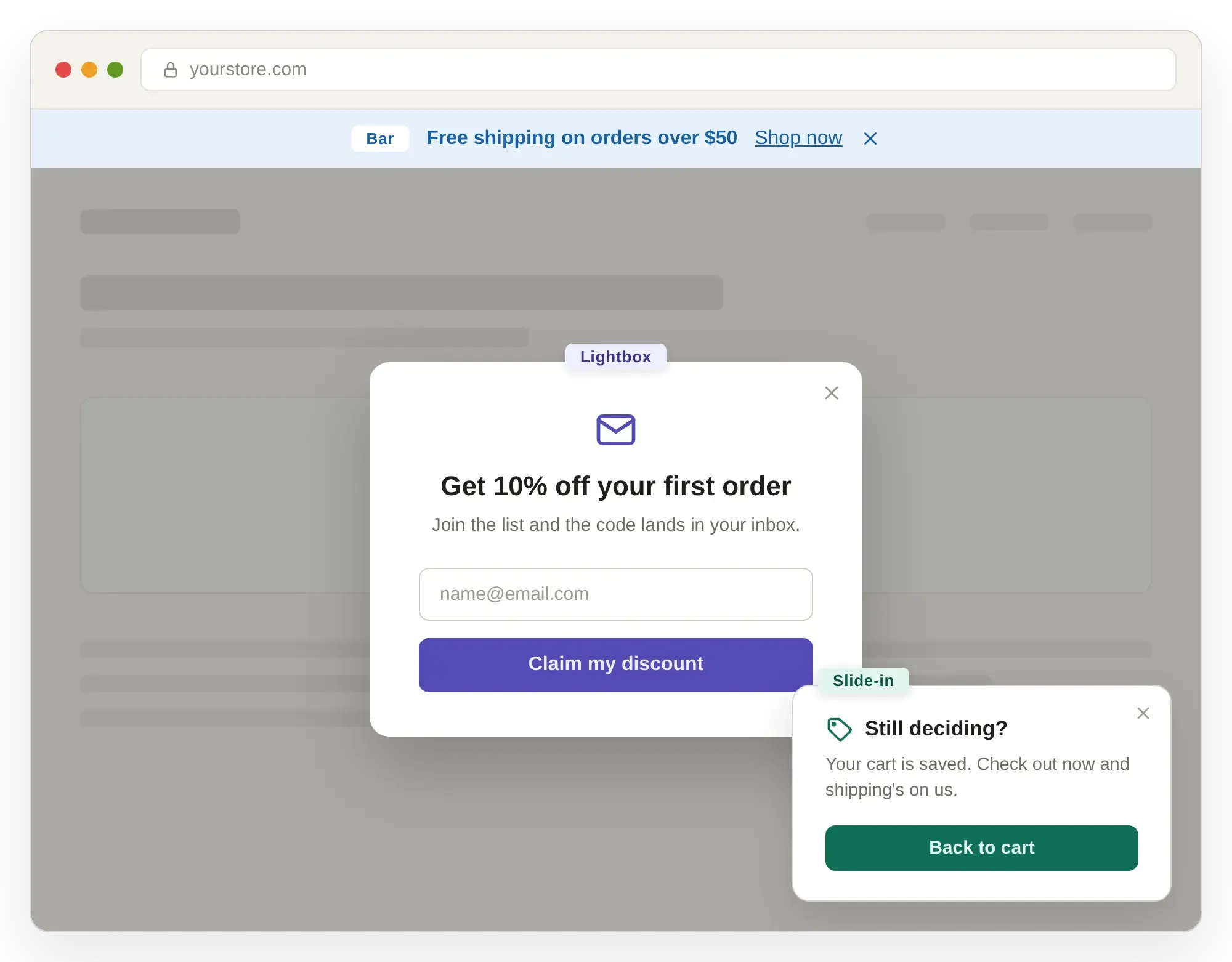
There are far more types of popups than the plain email box most stores start with.
This guide covers 29 types of popups, organized by format, trigger, and goal.
I will guide you through all the important types of popups. No matter if you run a Shopify store, a SaaS business, or a nonprofit, you will find a format here that works for you.
What is a popup?
A popup is a small window or overlay that shows up on a webpage while someone is browsing. Visitors' behavior or a click on a specific page or collection triggers it.
Pop-ups remain the most popular visitor engagement tool for modern eCommerce brands. Different designs serve completely unique purposes for your daily promotional goals.
How to choose the right popup (in 4 steps)
New to this? Here is the short version. The full breakdown is at the bottom.
- Start with your goal: Emails, sales, or feedback? Pick one.
- Match the trigger: Timing drives most of your results, so this matters most.
- Pick a format that fits: Choose a shape that suits your brand and works on mobile.
- Test two versions: Your audience will surprise you every time.
Want the details? Jump to Picking the right types of popups below.
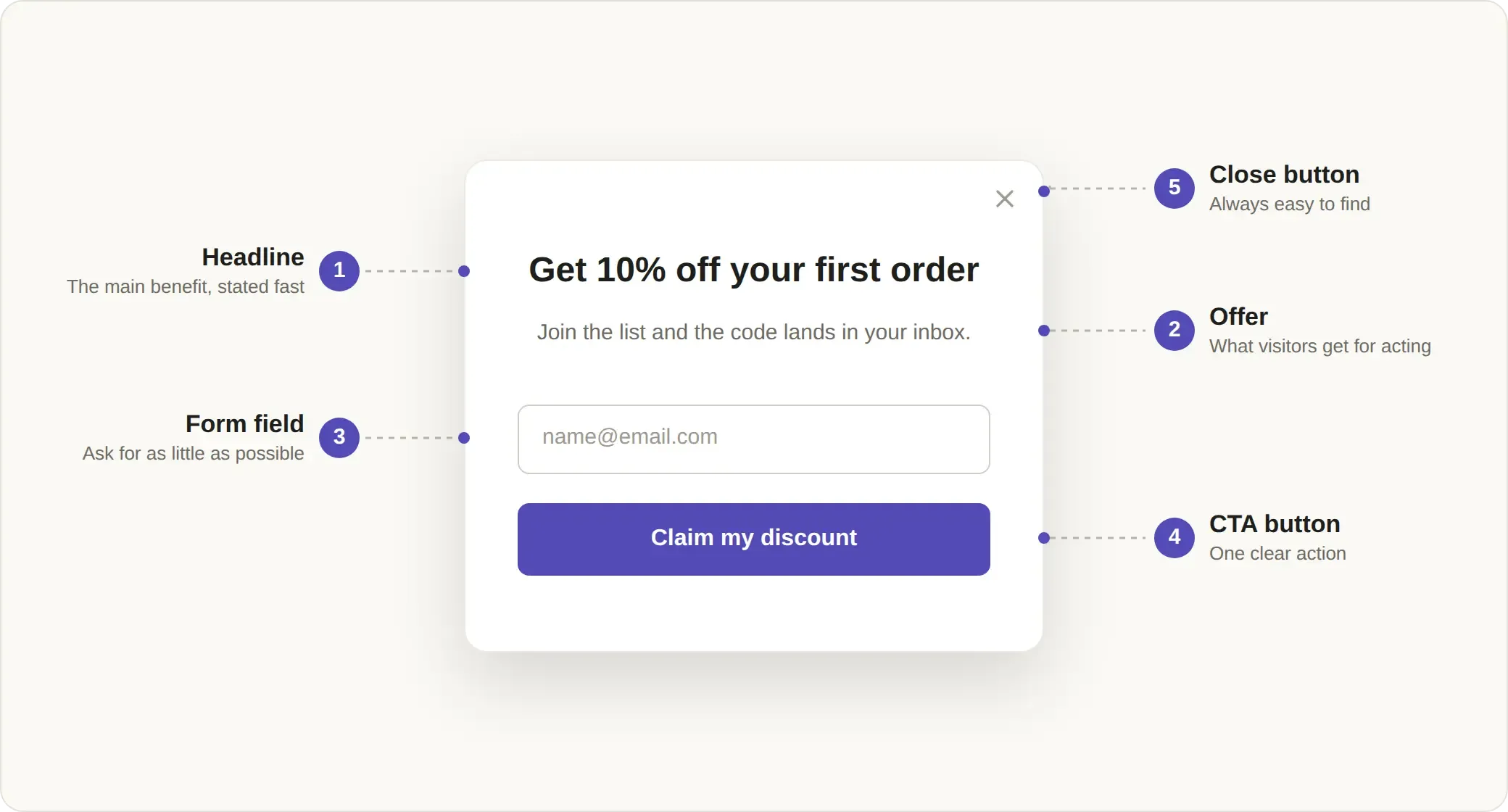
How types of popups are sorted
Format is about appearance. Trigger is about timing. Goal is the reason for the popup.
You can present the same discount in several ways. It might appear as a box in the center of the screen when someone enters, as a slide-in when they scroll, or as a bar pinned to the top.
Timing often matters more than design. Showing a popup to the right visitor at the right moment can make a big difference.
Types of popups by goal: quick pick table
If you are in a hurry, start by deciding what you want to achieve. Then, choose the right trigger and format to help you get there.
Types of popups by goal
Save this part. Everything you need from the guide is right here.
Types of popups: three types of popups
Types of popups by format: This refers to the shape of the popup and where it appears on the screen.
Types of popups by trigger: The trigger is what determines when your popup will show up.
Types of popups by goal: The goal is the main reason for the popup and what you want users to do.
Below, you will find a combined description of all popup types.
1. Lightbox popup
- A classic box appears in the center of the screen and dims the rest of the page.
- It focuses all attention on a single message, making it ideal for email signups.
- Since it blocks the page content, use this type carefully.
2. Slide-in popup
- This popup slides in from a corner, most often the bottom right.
- It feels less intrusive than a lightbox, since readers can continue browsing.
- This format works best for blog content and gentle offers.
3. Floating bar
- A thin bar stays fixed at the top or bottom of the screen.
- It remains visible as people scroll but does not cover the main content.
- This type is great for sharing messages such as free shipping or live sales.
4. Fullscreen popup (welcome mat)
- This popup covers the whole screen to quickly get users’ attention.
- It can annoy users, so use it only for major launches or when welcoming someone for the first time.
- Avoid using it for small updates or less important news.
5. Yes/No pop-up
- This popup offers two choices instead of just one call to action.
- It lowers pressure by using a two-step approach.
- This format draws people in by tapping into our tendency to dislike unfinished tasks.
6. Multi-step popup
- It breaks the request into smaller steps, such as asking for an email first, then preferences, and finally offering a reward.
- This type usually achieves about a 5% conversion rate.
- It is excellent for steady and high-volume subscriber growth.
7. Spin-to-win wheel
- This is a game-style popup where visitors spin a wheel to win a prize.
- It boosts signups by making the reward feel earned.
- If your brand is more premium, this approach can seem a bit gimmicky.
8. Video popup
- This popup is centered around a short video clip.
- It is perfect for product demos and new launches.
- This format works best when showing a product is more effective than simply describing it.
9. Embedded or inline popup
- This popup appears within the page content instead of floating above it.
- It is the least pushy and intrusive option available.
- This type is perfect for collecting signups without interrupting the reading experience.
10. Notification feed
- A notification feed shows a small stream of recent activity messages, such as a sale or a new signup.
- It is extremely subtle but also highly engaging.
- This approach can drive significant revenue from even a small percentage of people who click.
11. Product category menu popup
- Works like a small navigation panel rather than a standard call-to-action button.
- Shows attractive options so users can easily browse different collections.
- Helps users without getting in the way.
12. On-entry and timed popups
- This popup appears either as soon as someone lands on the page or after a short delay.
- Quick welcome popups can work well, but waiting a few seconds often leads to better conversion rates.
- A short delay lets the reader settle in before you ask them to take action.
13. Exit-intent popup
- This popup appears when the cursor moves toward leaving the page.
- It gives you one last chance to keep a visitor from leaving.
- This type pairs perfectly with a discount offer or a cart abandonment popup. See these exit intent popup examples in action.
14. Scroll-triggered popup
- This popup appears when someone scrolls to a certain point, such as halfway down a post.
- It targets visitors who are already engaged with the content.
- This approach makes the request feel earned instead of random.
15. On-click popup
- This popup appears only when a user clicks a button or link on purpose.
- It shows that the user is genuinely interested.
- On-click popups usually convert much better than automatic ones, sometimes by as much as ten times.
16. On-hover popup
- This popup appears when the cursor hovers over a specific element.
- It is a niche format, but very useful for quick previews.
- This type is great for showing extra details without needing a click.
17. Page or URL-based popup
- This popup is set to appear only on specific pages of your site.
- It lets you match the offer to the content, such as showing different popups on a pricing page versus a blog.
- High relevance can significantly increase conversion rates.
18. Geo-targeted popup
- This popup changes based on the visitor's physical location.
- It is ideal for local currency updates, shipping notes, or deals limited to certain regions.
19. Device-specific popup
- This popup adapts to desktop, tablet, or phone screens.
- It is crucial for maintaining a good experience on mobile devices.
- This approach ensures that mobile popups stay small and lightweight.
20. Returning-visitor popup
- This popup uses cookies to greet people who have visited your site before.
- It takes advantage of visitors' existing familiarity with your brand.
- This is a subtle but effective way to increase signup rates.
21. Re-engagement popup
- This popup appears after a period of user inactivity.
- It helps bring a drifting visitor back into the browsing experience.
- This popup acts as a simple and effective nudge.
22. Date or event-based trigger (Holiday popups)
- This popup is scheduled to appear only during certain calendar periods.
- It connects offers to holidays such as Black Friday or Valentine's Day.
- This approach makes the timing feel very relevant and urgent.
23. Email and SMS list building
- This method offers value, such as newsletters or lead magnets, in exchange for contact information. These email popup examples and this SMS popup guide show what works.
- It works best when you keep it to a single input field.
24. Discounts and urgency
- This popup encourages people to act quickly by using codes, flash sales, or timers.
- It creates a sense of urgency and fear of missing out, prompting immediate action.
- This approach is excellent for creating short bursts of high sales.
25. Ecommerce, sales, and fundraising
- This popup moves users toward making a purchase, such as through upsells, cross-sells, or back-in-stock alerts.
- This type is especially effective for driving revenue in online stores. You can choose from these best Shopify popup apps to run them.
- It is highly effective for recovering abandoned carts.
26. Lead generation
- This popup captures warmer leads for higher-value sales as part of a broader Shopify lead generation strategy.
- It uses demo requests, webinars, and interactive quizzes.
- Quizzes work especially well because they feel helpful rather than pushy.
27. Engagement and social proof
- This popup builds trust by showing reviews, activity feeds, and surveys.
- A well-placed 5-star review can encourage a hesitant buyer to make a purchase.
28. Retention
- This popup helps keep existing customers coming back.
- It uses loyalty signups, birthday offers, and referral programs.
- This approach is much more cost-effective than always trying to get new customers.
29. Compliance and utility
- This popup handles the practical and required aspects of web browsing.
- It covers cookie consent, age verification, and login prompts.
- This type is functional and necessary, but not mainly focused on marketing.
Picking the right types of popups
Start with your goal: Do you want to collect emails, boost sales, or get feedback? Let this goal shape your design choices.
Pick the trigger next: Choose when your popup should appear. This decision has a big impact on your results. Make sure the timing matches what your users are doing.
Match triggers to actions: Use exit-intent popups to catch people leaving their cart, on-click popups for interested leads, and scroll popups for blog signups.
Choose the format last: Pick a style that matches your brand and works well on mobile devices.
Always test: Always test your popups. Your audience may react in ways you do not expect.
Common popup mistakes
You picked the right type and wrote a solid offer. So why is nobody signing up? Usually it is one of these:
- Showing the popup too soon: If it appears before the page loads, visitors may leave. Wait 5 to 10 seconds so people can settle in.
- Requesting too much information: Each extra field can lower signups. Ask for just one thing, like an email address. You can collect more details later.
- Showing multiple popups: If visitors close one popup and see another right away, they may leave your site. Only show one popup at a time.
- Not optimizing for mobile: Google may lower your ranking if popups block content on phones. Use smaller, easy-to-close popups for mobile users.
- Showing everyone the same thing: A first-timer and a loyal customer need different messages. Use targeting.
- Making a weak offer: Saying "Sign up for our newsletter" does not motivate people. Offering "Get 10% off" gives them a real reason. Always offer something valuable.
- Not limiting popup frequency: If visitors see the same popup every time, it becomes annoying. Show it only once or twice per session, then hide it for a week.
- Setting and forgetting: Your first popup is just a starting point. Test two versions and keep the one that works best.
Optinify is a Shopify popup app. It takes care of timing delays, suppression windows, and mobile sizing for you. This way, these mistakes never happen.
Frequently Asked Questions
Wrapping up: Types of popups
Start by deciding what you want to achieve with your popups. Once you know your goal, choose the right trigger and format to match.
Choose two or three popup types from this guide. Set them up using your Shopify marketing tools and see how they perform.
Your results will reveal what your visitors are really interested in.
Begin with a small test, keep an eye on your results, and expand the strategies that perform best.
Ready to launch your first popup?
With Optinify, you can quickly create any popup featured in this guide, such as lightbox, floating bar, exit intent, or spin-to-win, all without needing to code.
Free 14-day trial • Setup in 60 seconds • Human support