
Shopify Conversion Rate Optimization: Complete CRO Guide
Use Shopify conversion rate optimization to find sales leaks. Get CRO audit tips, product page fixes, checkout tests, and a 30-day plan.
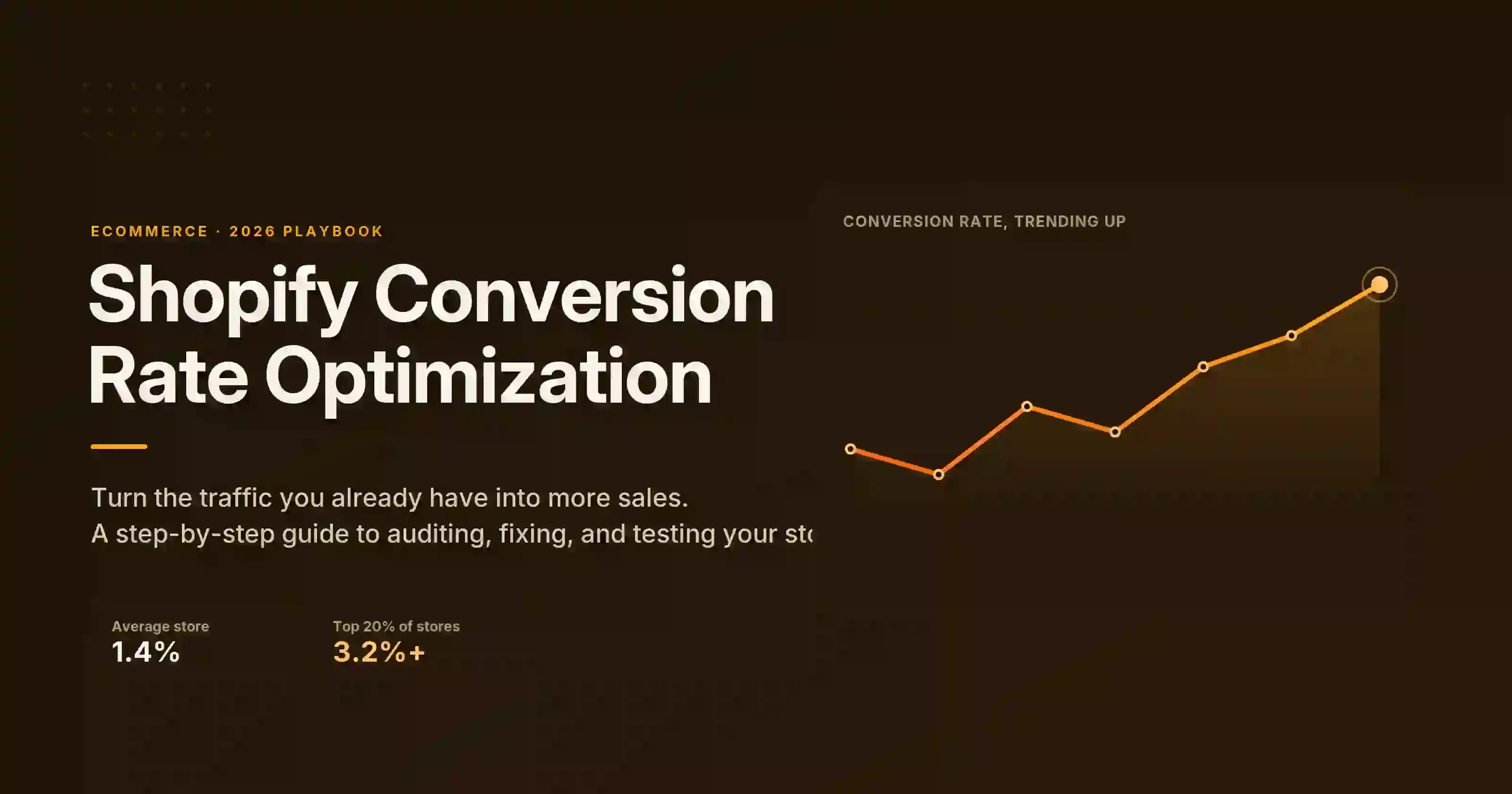
Shopify conversion rate optimization is all about fixing problems. These problems stop visitors from buying.
The best Shopify CRO strategy goes beyond changing button colors. It starts by identifying the exact point where qualified shoppers leave your store.
This guide will show you how to measure your Shopify conversion funnel, spot any issues, and improve the pages that affect your sales.
Shopify Conversion Rate Optimization at a Glance
Here are four simple steps you can use to boost your Shopify store’s conversion rate.
- First, measure each stage of your sales funnel.
- Next, find where most customers drop off.
- Then, figure out why customers leave at that stage.
- Finally, make a specific change and measure the result.
This Shopify CRO Guide covers:
- Shopify conversion rate optimization explained
- Measuring your Shopify conversion rate
- What counts as a good Shopify conversion rate?
- Diagnosing Shopify conversion leaks
- Improving traffic quality and landing-page relevance
- Improving Shopify product discovery
- Optimizing Shopify product pages
- Reducing Shopify cart and checkout friction
- Improving Shopify mobile experience and store speed
- Building trust with Shopify shoppers
- Recovering Shopify visitors
- Using AI for Shopify CRO
- Prioritizing and testing CRO changes
- 30-Day Shopify Conversion Rate Optimization Plan
- Shopify Conversion Rate Optimization Checklist
- Shopify Conversion Rate Optimization FAQs
What Is Shopify Conversion Rate Optimization?
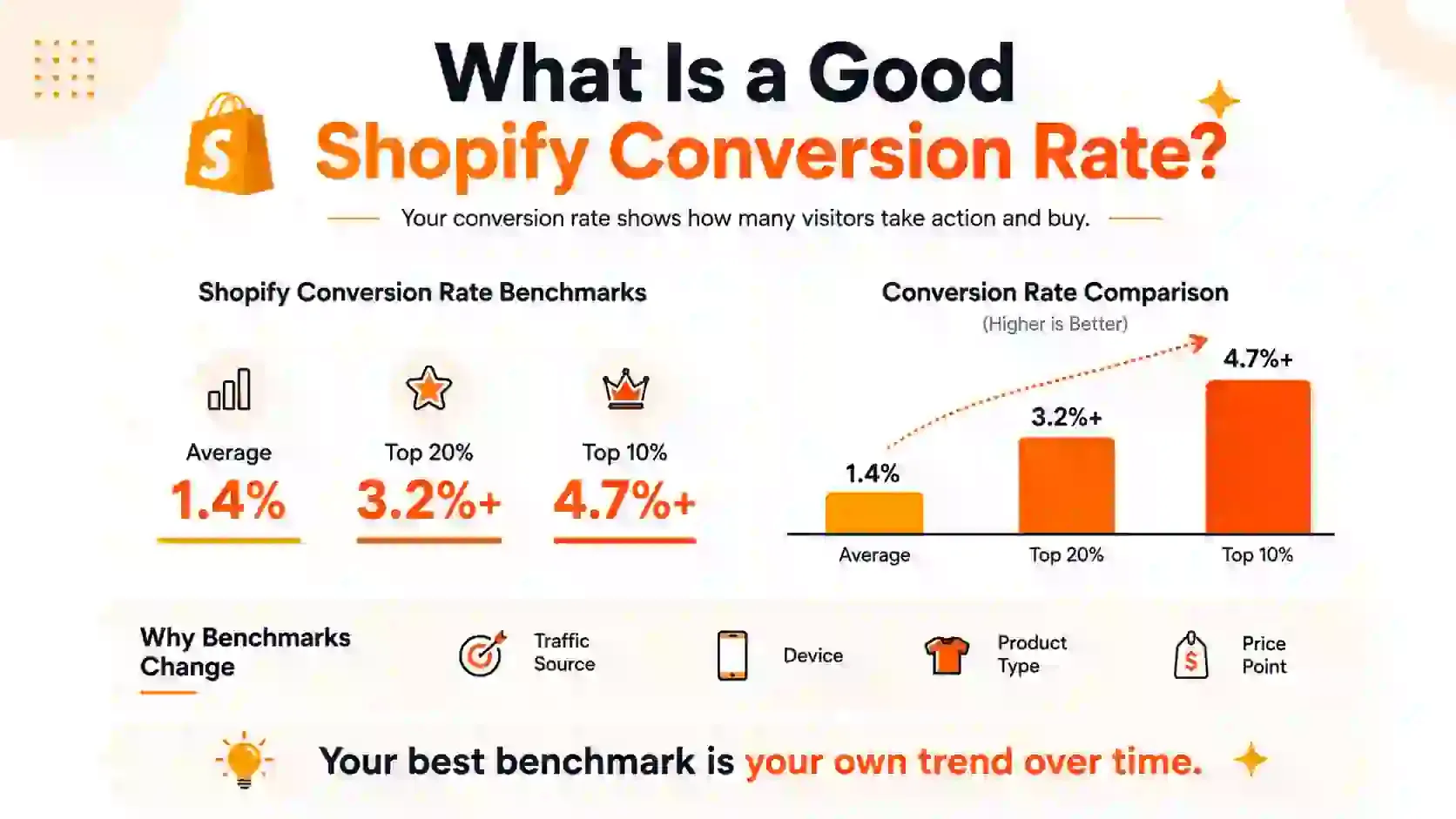
Shopify conversion rate optimization helps increase sales. In simple terms, it improves the steps that lead to a purchase.
This includes:
- Product views
- Searches
- Adding items to the cart
- Starting checkout
- Making a purchase
The main goal is to help more interested shoppers complete their purchases.
Shopify CRO also uses tools that are already part of the Shopify platform.
These tools include:
- Shopify popup app
- Themes
- Analytics
- Checkout features
- Shop Pay
- Shopify Markets
- Search
- Apps
However, CRO cannot solve every business problem. It can make the buying process smoother, but it cannot fix a weak product or poor offer.
How to Measure Your Shopify Conversion Rate
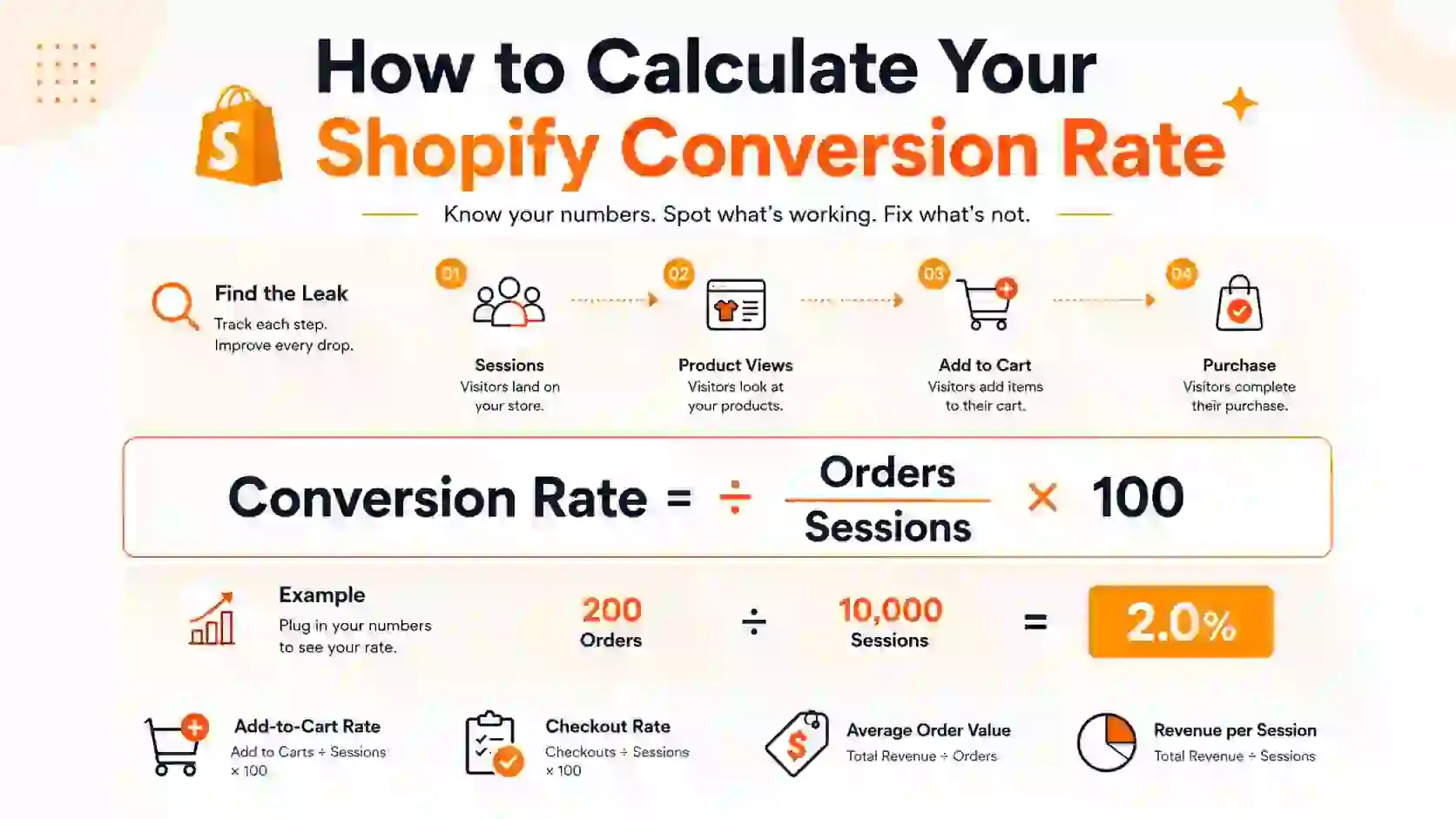
You can calculate your Shopify conversion rate with this formula:
Shopify conversion rate = (Number of sessions that completed checkout ÷ Total online store sessions) × 100
For example, imagine your store gets 10,000 visits. If 200 of those visits result in purchases, divide 200 by 10,000.
Then, multiply the result by 100.
200 ÷ 10,000 × 100 = 2%
Therefore, your Shopify conversion rate would be 2%.
In Shopify Analytics, go to Analytics and click Reports. Next, open the Conversion Rate Over Time report.
Then, break down the data by device, traffic source, landing page, product, and customer location. Also, compare similar time periods. This makes it easier to spot meaningful changes.
Shopify’s online store conversion funnel tracks each visit. First, it records the store visit. Next, it tracks cart additions and checkout activity. Finally, it records completed purchases.
As a result, you can see where shoppers leave the funnel.
What Is a Good Shopify Conversion Rate Optimization?
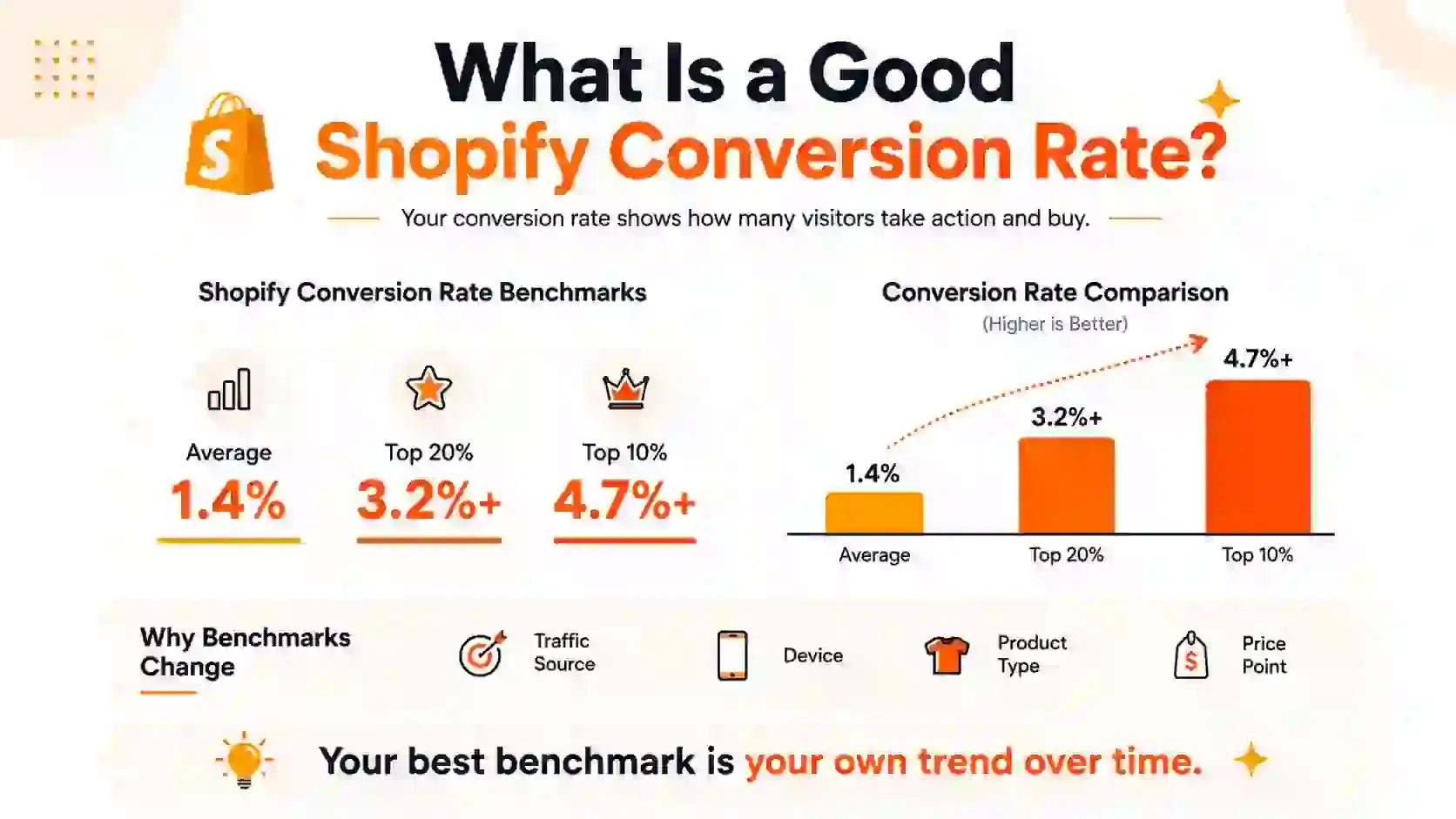
Your Shopify conversion rate depends on several factors. These include your product, pricing, traffic quality, target market, and customer devices.
Therefore, do not judge your store by one number alone. Instead, compare your current performance with previous periods and relevant benchmarks.
Shopify Conversion Rate Optimization Audit Steps
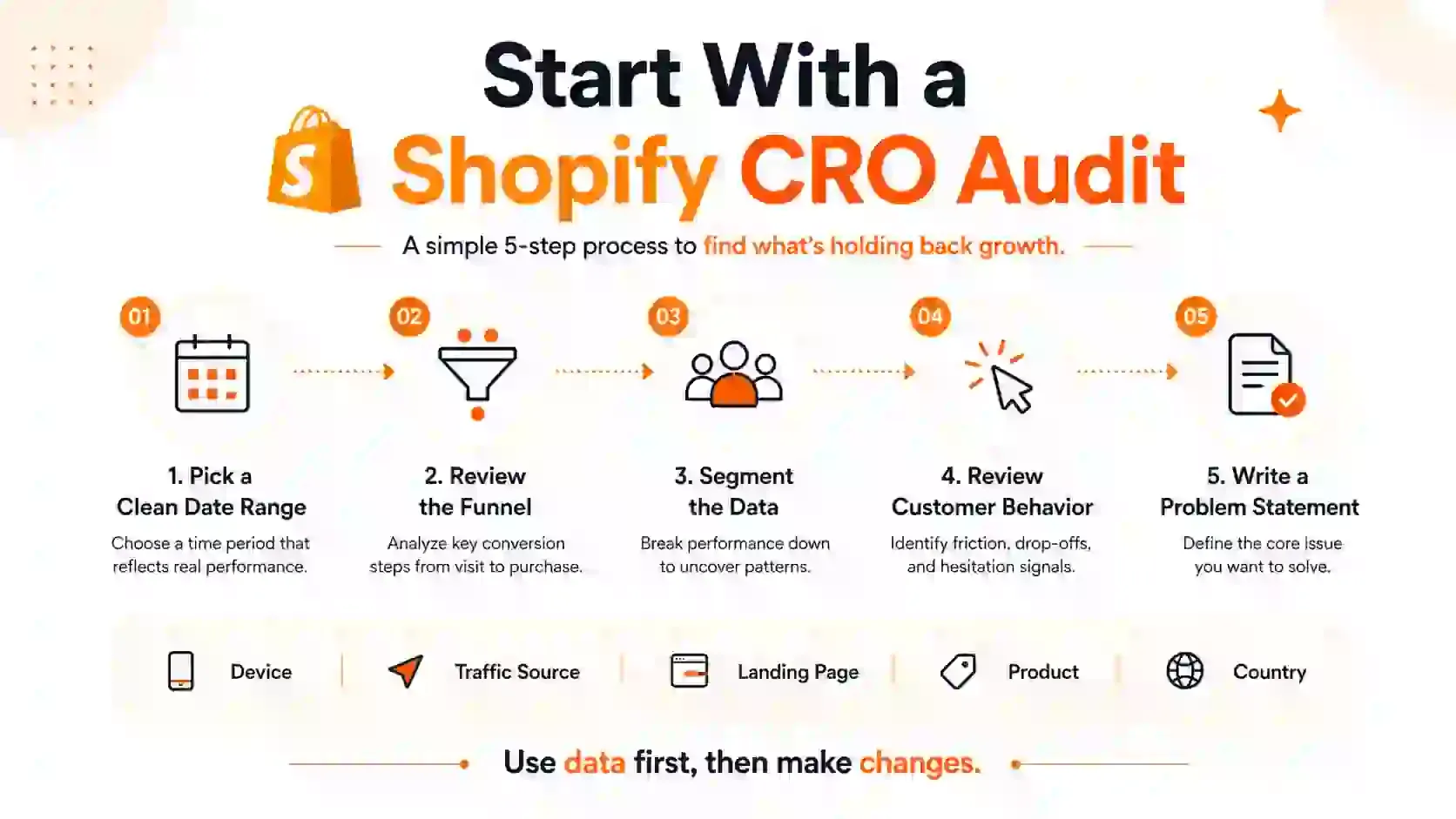
First, identify the main issue. Find where the biggest qualified drop-off happens.
Next, look at the right data. Choose a date range without unusual events or major promotions.
Then, learn how your customers behave. Review the information available from your store and customer interactions.
In addition, you can use zero-party data. Ask shoppers what they like, what they want, and what concerns them.
After that, write a clear problem statement. Include the audience, funnel stage, evidence, and business impact.
Finally, decide what to fix first. Focus on the problem with the strongest evidence and greatest impact.
Improve Traffic Quality and Landing-Page Relevance
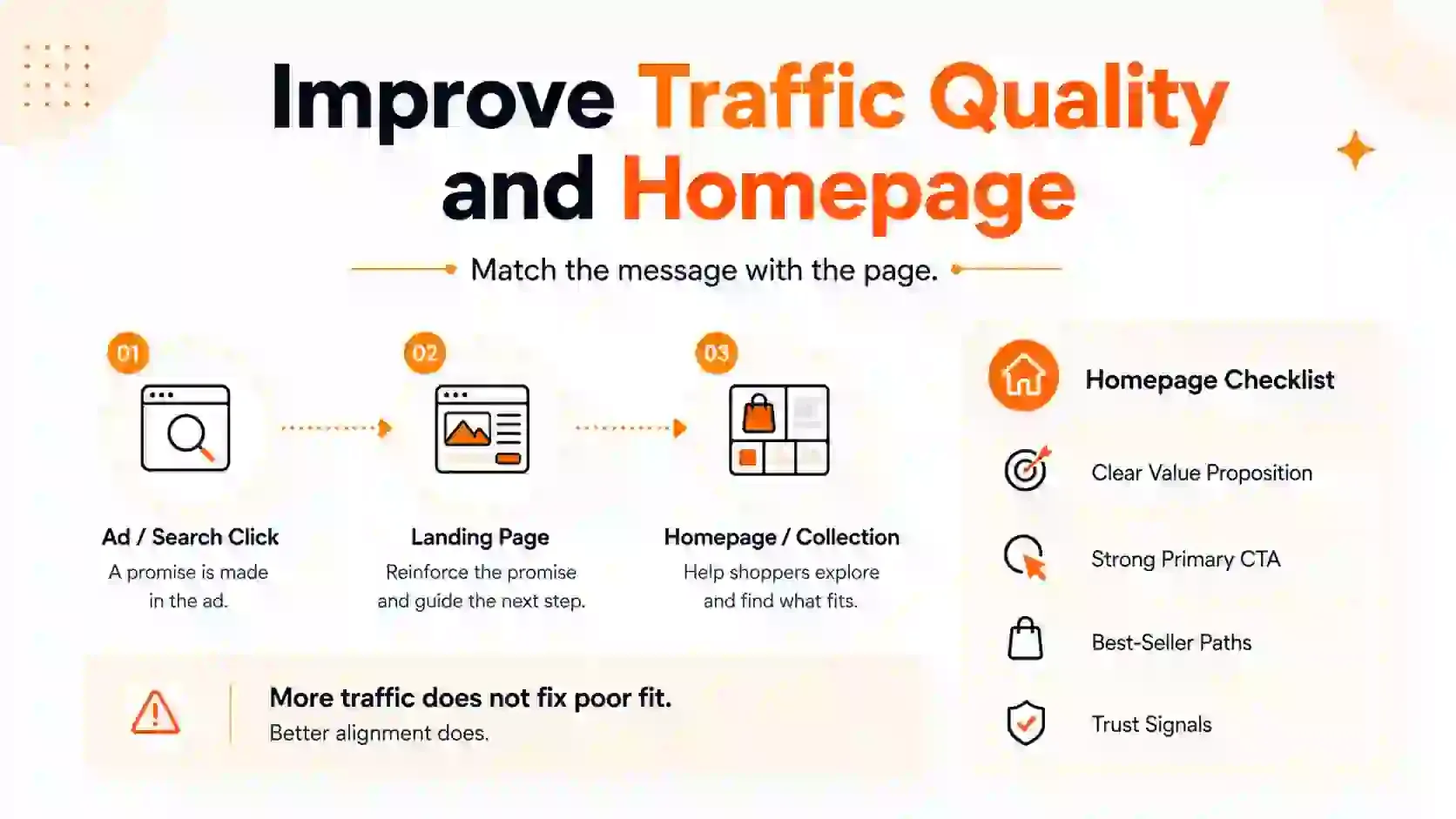
Traffic quality plays an important role in Shopify conversion rate optimization. The right visitors are more likely to move through your funnel and complete a purchase.
- Match Ads With the Right Landing Page
- Match the Page With Search Intent
- Compare Traffic Sources by Revenue
Optinify Pro Tip
Use these insights as part of your overall Shopify marketing strategy. As a result, you can improve both traffic quality and on-site conversions.
Improve Shopify Product Discovery
Product discovery is an important part of Shopify conversion rate optimization. It helps visitors find relevant products faster and makes the buying journey easier.
To improve product discovery:
- Make sure your homepage clearly explains what your store offers
- Guide shoppers toward products they are most likely to buy
- Use clear collection names and make filters and sorting easy to use
- Make product cards more informative and appealing
- Fix Search Synonyms and Zero-Result Searches
As a result, shoppers can reach relevant products with less effort.
How to Make Your Shopify Product Pages Better
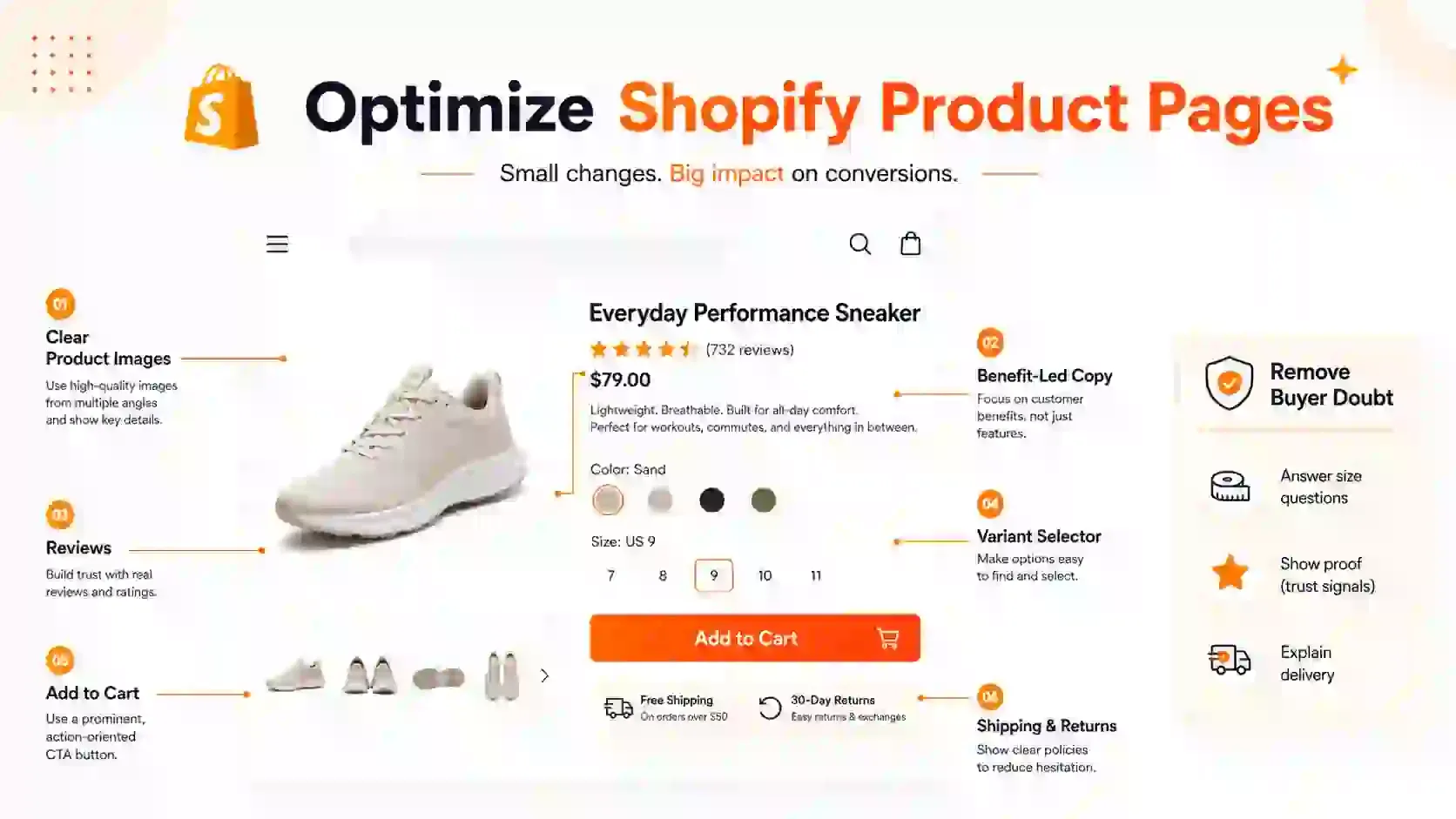
Product pages are a core part of Shopify conversion rate optimization. A strong product page gives customers the confidence they need to make a purchase.
Therefore, focus on the information shoppers need before they buy.
- Make the First Thing Shoppers See Stand Out
- Give a Clear and Detailed Product Summary
- Show How Each Feature Helps the Customer
- Address Common Questions or Concerns
- Add Photos or Videos That Help Customers Decide
- Make Product Options Easy to Understand
- Show Reviews or Testimonials Where Customers Make Choices
In addition, keep important buying information easy to find. Shoppers should not need to search for basic product details.
Reduce Shopify Cart and Checkout Friction
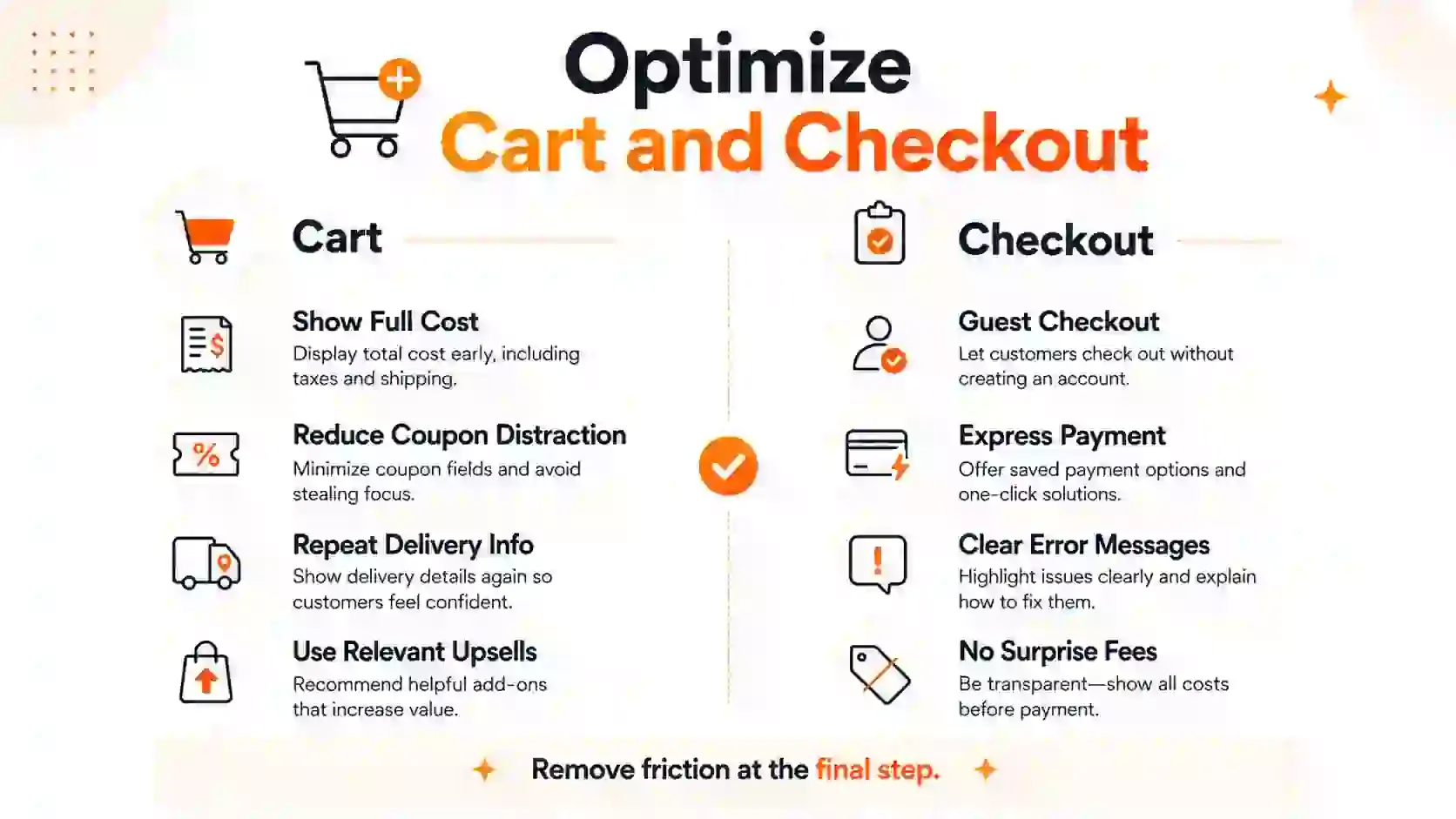
When shoppers reach the cart or checkout, they are usually close to buying.
Reducing cart and checkout friction is essential for Shopify conversion rate optimization because these shoppers are already close to completing a purchase.
Therefore, remove anything that makes the process confusing or difficult.
- Show the Full Cost Early
- Reduce Coupon and Upsell Distractions
- Repeat Delivery and Returns Information
- Offer Express and Guest Checkout
- Reduce Form Friction
- Investigate Failed Payments
Tip
Shopify allows you to review payment events in abandoned checkout records.
First, test the checkout on different devices. Then, test different regions and payment methods. A checkout may work in one situation but fail in another.
Improve Shopify Mobile Experience and Store Speed
Mobile usability and speed are important parts of Shopify conversion rate optimization. They go hand in hand, so test both together.
Complete the One-Handed Shopping Test
Try opening the menu with one hand. Then, find a product, choose a variant, and add it to the cart.
Finally, start the checkout process. Any difficult step may need improvement.
Make Important Actions Easy to Tap
Make sure your buttons are large enough to tap easily.
In addition, leave enough space between buttons and links. This reduces accidental taps on mobile devices.
Control Mobile Pop-Ups
Do not show a large pop-up as soon as the page loads. Instead, give visitors time to explore.
Also, keep forms short and easy to close.
A good mobile popup should fit the screen. It should also use large tap areas and avoid blocking important content.
Keep Purchase Information Visible
Display the product, price, main benefit, variants, and buy button early on the page.
This way, shoppers can quickly understand the offer and take action.
Review Core Web Vitals
Look at Shopify’s Web Performance reports. These reports show how quickly your store loads for real visitors.
Next, check the three Core Web Vitals:
- Largest Contentful Paint
- Interaction to Next Paint
- Cumulative Layout Shift
Together, these metrics show loading speed, responsiveness, and layout stability.
Audit Themes, Apps and Media
Look for large theme sections, animations, apps, scripts, images, and videos.
Then, remove anything you do not need. Also, resize large media files when possible.
Optinify Pro Tip
Before adding a new app, check whether your existing Shopify marketing tools already meet your needs. This can help you avoid unnecessary apps and extra page weight.
How to Build Trust With Your Shopify Shoppers
Customers are more likely to trust your store when they know who is behind it.
Trust also supports Shopify conversion rate optimization. When shoppers feel confident about your business, they are more likely to continue toward checkout.
Therefore, make important business information easy to find.
- Share Genuine Business Details
- Highlight Authentic Reviews and Be Transparent About Urgency
- Make Your Return Policy Easy to Understand
- Show Prices in Your Customer’s Local Currency
- Let Customers Know About Duties and Taxes Upfront
- Provide Local Delivery Estimates and Payment Options
- Translate Important Purchase Information for Your Customers
In addition, keep this information consistent across your store. Conflicting details can make shoppers hesitate.
Recover Shopify Visitors Without Hurting Their Experience
Recovery campaigns can support Shopify conversion rate optimization when they address a clear conversion problem. However, use them only when the data shows where shoppers are dropping off.
Then, match the recovery tactic to that problem. For example, use checkout recovery when shoppers abandon checkout.
If your main goal is to grow your list, connect your campaign to a broader Shopify lead generation plan.
In addition, test different lead magnet ideas. This can help you discover what attracts the right shoppers.
Recover Abandoned Checkouts
Show shoppers the products they selected. Then, link them directly back to checkout.
This makes it easier for them to continue where they stopped.
Use Browse and SMS Recovery
Use Browse Recovery only when tracking and consent are in place.
First, get clear permission before sending promotional SMS messages. Then, explain what shoppers will receive.
An SMS popup should clearly explain the value of signing up. In addition, keep the message short and easy to understand.
Offer Back-in-Stock Alerts
Allow shoppers to request alerts for sold-out products.
As a result, interested customers can return when the product becomes available again.
Use Discounts Selectively
Before offering a discount, try product education, reviews, delivery reassurance, or customer support.
However, discounts can still work when they solve a clear conversion problem.
Review relevant sales promotion examples for alternatives to constant discounts.
Then, use discount popup examples when an offer matches customer intent and your profit margin.
Match Pop-Ups With Visitor Intent
Optinify is a Shopify popup app that helps capture emails and SMS.
It also supports targeted deals, exit-intent campaigns, and A/B testing.
First, choose from different types of popups based on the visitor’s funnel stage.
For example, a welcome popup can engage a first-time visitor. Meanwhile, a recovery-focused popup may work better later in the buying journey.
Need help choosing the right campaign?
14-day free trial available
Use AI for Shopify Conversion Rate Optimization
AI can support Shopify CRO in several ways:
- Organizing data
- Summarizing feedback
- Generating test ideas
However, AI should not make final optimization decisions without reliable evidence.
Instead, use AI to support your analysis. Then, review the findings before making important changes.
Create Useful, Original Content
Google’s guidance for generative AI features on Google Search says that core SEO practices still matter.
Therefore, pages should remain useful and original. They should also be clear and easy to crawl.
In addition, focus on content that genuinely helps shoppers. Avoid adding content only to increase word count.
Test Shopify Conversion Rate Optimization Changes
A Shopify conversion rate optimization backlog turns research into focused action.
First, collect your optimization ideas. Next, rank them by potential impact and evidence.
Then, consider how much effort each change requires. Finally, test the highest-priority ideas first.
Your testing process can include:
- Score Ideas With ICE
- Label the Supporting Evidence
- Write a Clear Test Hypothesis
- Choose One Main Metric
- Add a Guardrail Metric
- Run and Document the Test
- Use Alternatives for Low-Traffic Stores
This approach helps you focus on changes that are more likely to improve results.
30-Day Shopify Conversion Rate Optimization Plan
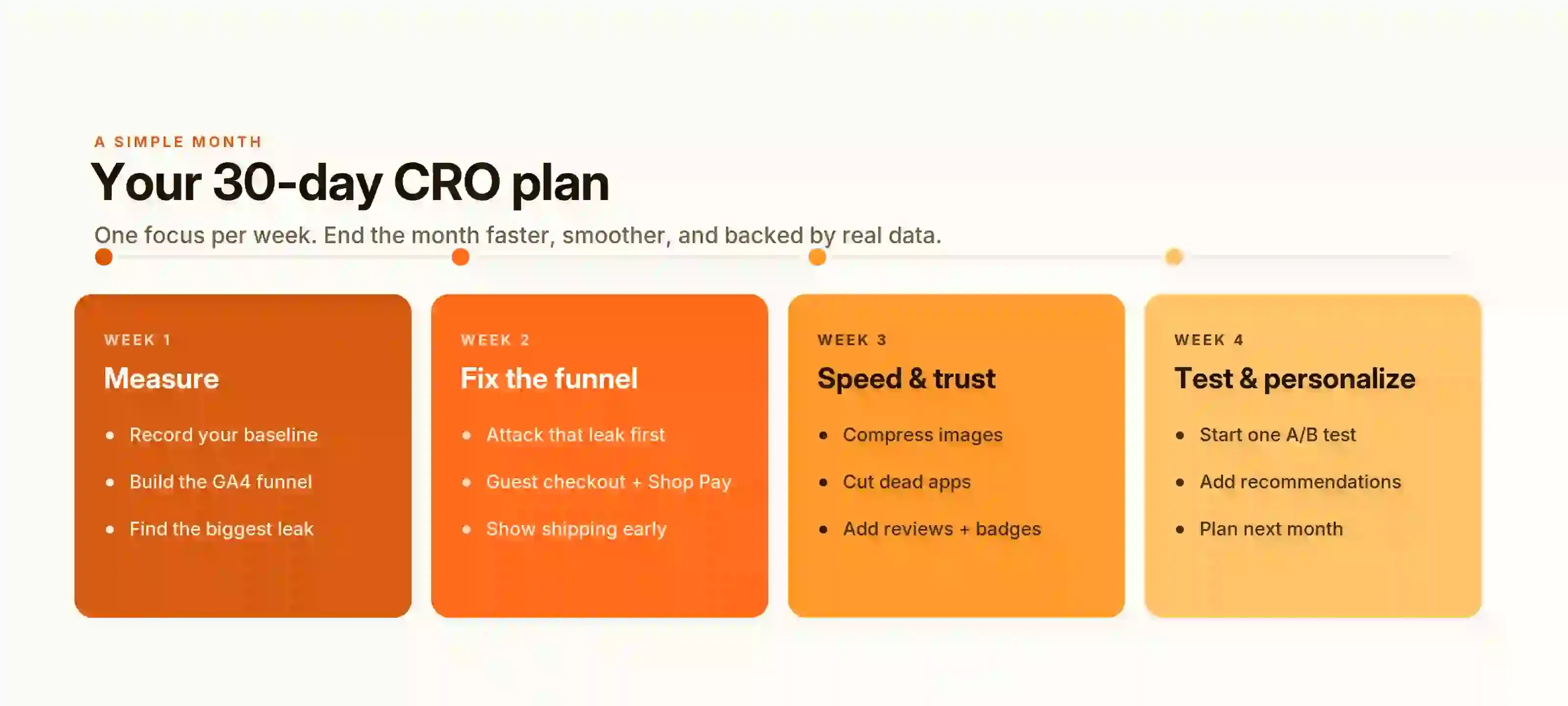
A 30-day plan helps a store move from analysis to action.
Instead of redesigning everything at once, improve one area at a time.
- First: Measure and Diagnose
- Next: Fix Critical Friction
- Then: Improve Purchase Confidence
- Finally: Test and Document
As a result, each stage builds on what you learned in the previous stage.
Shopify Conversion Rate Optimization Checklist
Use this checklist to review the most important parts of your Shopify CRO strategy:
- Analytics
- Traffic and Discovery
- Product Pages
- Cart and Checkout
- Mobile and Speed
- Trust
- Testing
Finally, review the checklist regularly. Customer behavior and store performance can change over time.
Frequently Asked Questions
Final Shopify CRO Recommendations
Start by finding where most shoppers leave your Shopify sales funnel. Use store data and customer feedback to find the cause.
Fix one clear problem at a time. Test one focused change.
Track revenue, order value, refunds, and customer behavior.
Use Shopify apps only when they solve a clear problem. Remove any tool that slows the store or makes shopping harder.
What to read next
Ecommerce Popups: 14 Types, Examples & Best Practices
Learn how ecommerce popups work and discover 14 high-converting types. Grow sales without hurting user experience.
Read Article
21 Website Popup Examples for Shopify Stores and Why They Work
Explore 21 website popup examples for Shopify stores. See popup ideas for email capture, cart recovery, discounts, free shipping, SMS, and more.
Read Article
Spin to Win Popup: How Shopify Stores Can Grow Email Signups and Sales
Learn how spin to win popup actually work! Discover the best prizes and perfect timing strategies to boost conversions and grow Shopify sales.
Read Article